Android Software
Limitations of Excel for Mobile Devices
Brought to you by Microsoft — We know which features you don't need™
I use Excel (from Office 365) regularly for recording health and weather data. In using this application, I have found there are many shortcomings.These range from "Oh, this shouldn't be" to "What moron decided to remove this".
And yes, I do have an Office 365 subscription...
Date picker on a tablet
For reasons best known to Microsoft (we know which features you don't need™), the date picker has effectively been removed from Excel on tablets. This is a particularly baffling omission, given that the same feature is available on a phone. On a tablet — a device far better suited to spreadsheet work — touch-based calendar input actually makes sense. For date-heavy data entry, manually typing dates requires more taps and is far more error-prone.
(updated: 2 February 2026)
Inserting rows and formatting inheritance
On Excel for Mobile, inserting a new row is not as simple as it sounds. By default, the new row inherits the formatting of the preceding row. This might seem harmless until the preceding row is a heading, a total, or otherwise styled differently. Suddenly, a clean, consistent spreadsheet turns into a patchwork of unintended styles, and manual correction becomes necessary.
While this may appear minor, it quickly becomes tedious when building or updating spreadsheets incrementally. It is another example of a small design choice that undermines workflow efficiency on mobile devices.
(updated: 7 February 2026)
Graphs on a mobile device
One of the most frustrating issues with Excel for Mobile is that there is no way to edit an existing graph to add new datasets.
The irony is that a graph created on a desktop, using multiple data sources, displays perfectly on a mobile device. This strongly suggests that the underlying tools are present; they are simply not exposed to the user.
This limitation turns the mobile version of Excel into a read-only environment for anything beyond the simplest visualisations. As soon as a dataset grows or evolves over time, meaningful chart maintenance is pushed back to the desktop.
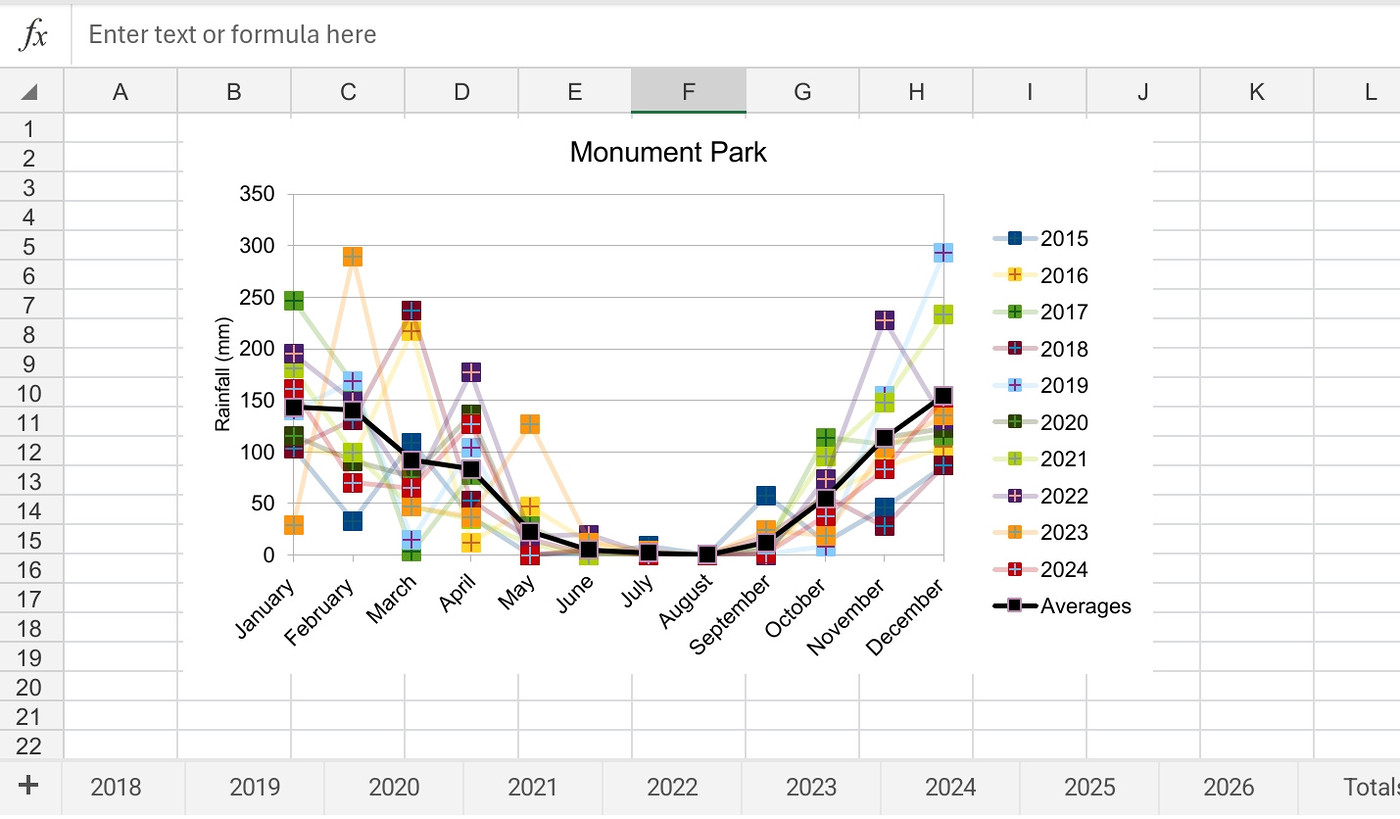
A screenshot from Excel for Mobile of rainfall graph using different datasets, created and updated on a desktop
(updated: 4 February 2026)
Locales and decimal separators
I prefer using a decimal point rather than a decimal comma, something I have done throughout my career. However, Microsoft — we know which features you don't need™ — has decided that Excel on mobile must follow the locale (see Footnote) set by the Android operating system. If that locale specifies a comma as the decimal separator, there is no way to override it.
It is, of course, possible to change the system locale to another region, but the locale governs more than just the decimal separator; it also affects date formats. I can change my locale to GB, but then I lose the YYYY/MM/DD date format, which I prefer precisely because it avoids ambiguity.
The problem is not the locale system itself, but the inability to override it.
(updated: 7 February 2026)
Copying data and formulas
Copying is one of the most basic interactions in any spreadsheet application. On Excel for Mobile, however, both the mechanics and the outcomes of copy operations are inconsistent.
Copying formulas within the same worksheet is unreliable. A long-press on a cell containing a simple formula may produce no copy option at all, only to work again moments later. When copying does succeed, the result may be a value rather than the formula itself — with no option to change this.
Copying data between worksheets as a live link is even more problematic. There is no straightforward way to paste a linked reference rather than a static value, making it difficult to build spreadsheets where data is shared or aggregated across sheets.
Even gesture-based copying is inconsistent. Dragging to copy a cell’s contents, a common and efficient technique on desktop, is difficult or unavailable on mobile devices. The fill handle is small, imprecise, and in some contexts absent entirely, making repetition of formulas or values unnecessarily awkward.
Together, these limitations make it difficult to reuse calculations or structure spreadsheets incrementally. Excel for Mobile increasingly behaves as a viewer that occasionally tolerates editing, rather than as a reliable spreadsheet tool.
(updated: 7 February 2026)
Closing remarks
I had hoped that an Android tablet, paired with an external keyboard, would be a reasonable alternative to a laptop. Unfortunately, the limitations outlined above mean that Excel, in particular, significantly restricts the usefulness of this setup.
Microsoft — we know which features you don't need™ — may well have an ulterior motive here: gently steering users back toward a traditional computer, where Windows remains a reliable revenue stream.
(updated: 5 February 2026)
Footnote
Different regions use different numeric conventions, most notably the use of commas or dots as decimal separators. Modern operating systems encode these conventions as part of a “locale”, which is typically inferred from language, region, or device settings rather than being an explicit user choice. Desktop applications usually allow these conventions to be overridden; Excel on mobile platforms does not. As a result, numeric data may be interpreted differently depending on where and how it is opened, even though the underlying values appear identical. This is not merely inconvenient — it undermines reliable data exchange.
The irony is that local banks, and even the government’s own revenue service, use a dot as the decimal separator. Known, real-world data sources are therefore aligned, yet Excel on mobile insists on enforcing a regional convention that no longer reflects actual usage.
(updated: 5 February 2026)
Endnote
Thanks have to go to ChatGPT for turning this from an out-and-out rant to something that is actually readable.
