Android Software
Frozen in its own intelligence: device slowdown
With apologies to John Wyndham
I'm thinking for you... please wait™
The device does not crash. It does not die. It simply hesitates. Every gesture is considered, processed, delayed. Swipes lag as though the screen were thinking too hard. Apps open eventually, but with the weary reluctance of something burdened by its own cleverness. The phone is not broken — it is frozen in its own intelligence.
No reset, no adjustment seems to free it. Even factory restoration offers only temporary relief; the threads of the launcher’s influence run deep, weaving through settings, processes, and cached data. The device wants to obey, to function — yet remains ensnared.
Like creatures tangled in a web they cannot escape, devices once ordinary now sit as monuments to a quiet, creeping power — a software ecosystem that dominates without force and immobilizes without pain.
Problem
Although I am referring to two oldish Xiaomi devices, the Redmi Note 12 and the Redmi 9A, this problem arises with any device having AI unnecessarily inserted into the various aspects of the operating system. The overheads required to run these AI extras often cause the device to slow down to such an extent that it is unusable.
I was trying to use the 9A as a recipe reader with Firefox, but the time taken to swap between pages, made this impossible.
The Note 12 was just tardy in general - not to the same extent as the 9A - but enough to be irritating.
The problem is usually caused by insufficient RAM, forcing the operating system to try and remove unneeded background processes to make space for the app in the foreground (memory churn).
(15 February 2026)
A solution
Changing the launcher to one with less "intelligence", such as Lawnchair, made a noticeable difference to the Xiaomi Redmi Note 12.
On the Xiaomi Redmi 9A, the difference was dramatic. What had sometimes taken minutes — regaining control after waking the device — was reduced to a matter of seconds. Even Firefox was able to load and follow links in the blink of an eye.
It would appear that the overheads in the Xiaomi launcher are just too much for anything, other than the most basic applications, to run.
(16 February 2026)
Concluding remarks
The devices were not rescued by new hardware, nor by deeper optimisation. They were restored by removing excess intelligence. In this case, less was not merely more — it was functional.
(16 February 2026)
Footnote
One thing to remember is that a launcher is an integral adjunct to the operating system. It requires access to functions that most apps do not require. The most notable of these is access to the Android notification subsystem. If you want notification badges (and badge counters) on app icons on your home screen, or notification bubbles (a popup preview), the launcher must be granted Notification Access so it can read incoming notifications.
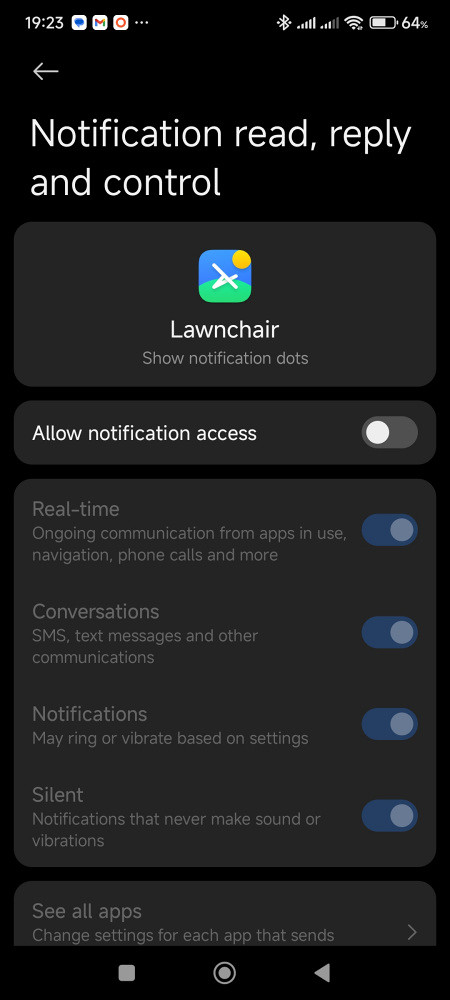
Notification access requirements
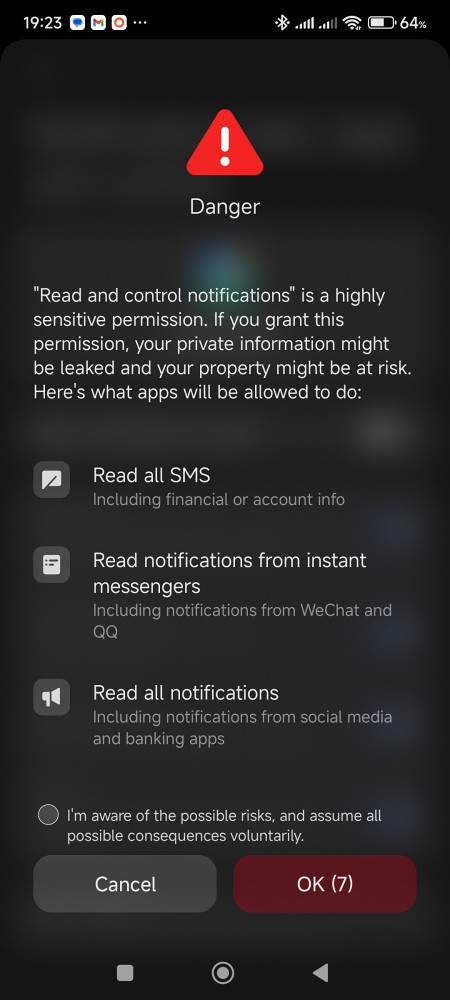
Screen to grant notification permission
Granting Notification Access allows the launcher to read notification content, including previews, which may contain sensitive information such as one-time passcodes (OTP), banking alerts or message excerpts. While reputable launchers distributed via Google Play are unlikely to misuse this access, it remains a permission that requires trust in the developer.
Notifications in the status bar work without issues, so this is only relevant if notification badges, or notification bubbles, are important to you.
(16 February 2026)
Update: alternative launchers
Some users may be put off by Lawnchair’s apparent permanent beta state. As of 17 February 2026, it was on version 15 beta 2, with version 16 beta 1 imminent and no stable version 15 released. This prompted me to look at a few other lightweight launchers which were usable without hitting a paywall.
Niagara
Niagara has a single screen containing a few regularly used apps and an alphabetical ribbon to allow access to other apps. It can display notification bubbles but, as mentioned above, requires notification access.
Niagara allows one widget to be added to the screen. This is a limitation for me as I like having both weather and calendar widgets available for a quick overview. It does have a built-in one line calendar widget, but this is hidden behind a paywall.
In spite of its speed, this launcher is a bit too minimalistic for me.
Lynx
Lynx has five screens, serving different purposes:
- The Home screen with a panel for regularly used apps and a link to the app drawer — apps can be placed on this page;
- The app drawer can also be accessed by swiping to the left;
- A Search screen which can be accessed by swiping down - the search function can search through apps, Google Search and Google Play — however, having a whole screen for a search bar is a bit wasteful;
Swiping to the right brings up a Favorites screen - this page will be populated with apps which you use regularly.
If you have given Lynx access to your contacts, your favourite contacts will also be shown here; and
- Swiping up brings up a Desktop screen where widgets can be placed.
Most of the screens have very little on them to start with. However, all the screens, except the home screen, can be disabled.
Lynx is very lightweight and very fast. I recommended it as an alternative to Lawnchair if you can get used to the interface.
Update: living with Lynx
After extended use, Lynx has proven to be more than merely lightweight. Once the settings are adjusted — even in the free version — the interface becomes efficient, uncluttered and unexpectedly pleasant to use.
In day-to-day operation, it definitely feels faster and more responsive than the default launcher. What initially appeared minimalist now feels deliberate rather than sparse.
It appears that, in this case, reducing intelligence has not reduced capability.
(25 February 2026)
