Android Hardware
External Keyboard Cheat Sheet
These are some shortcuts for an external keyboard which I have found to be quite useful. Some of these may only work with Gboard.
Some keyboards may have the symbol ⌘ instead of Command.
1. System Navigation & Controls
| Shortcut | Action |
|---|---|
| Command + / | Display system shortcut overview |
| Command + Enter | Go to Home screen |
| Command + N | Open Notification shade |
| Command + Tab | Open Recent Apps / Multitasking view |
| Command + Z | Open System Settings |
| Command + U | Open Accessibility Settings |
| Command + ← | System Back button |
| Alt + Tab | Switch to previous app |
| Alt + K | On-screen keyboard |
| Alt + I | External keyboard settings |
Command + Esc also acts as a Back button, but on some keyboards this is a tricky operation as it requires pressing the Fn key as well.
2. Quick App Launchers
| Shortcut | Action |
|---|---|
| Command + B | Launch default Web Browser |
| Command + E | Launch Email / Messaging |
| Command + C | Launch Contacts |
| Command + K | Launch Calendar |
| Command + P | Launch Music Player |
| Command + A | Launch Voice Assistant |
| Command + O | Launch Gemini |
3. Text & Symbol Modifiers
| Shortcut | Action |
|---|---|
| Alt + S | Open Android special character picker |
| Ctrl + Space | Cycle input languages / keyboard layouts |
Pro Tip: Avoid using Ctrl + Space to cycle input layouts on Samsung devices, as focus can get trapped when passing through the stock Samsung Keyboard. Instead, tap the language icon (e.g., EN) on the soft keyboard toolbar to safely select your layout from the pop-up menu.
I was given some Linux Compose Key-like key sequences for characters with accents, but these did not work. At the moment, the easiest way I have found to do this is to long press on a letter on the keyboard — if that letter has accented characters associated with it, a small pop-up window will appear showing these characters. If none are available, the letter will repeat. The character in the pop-up window can be selected by tapping the character or typing the number associated with it.
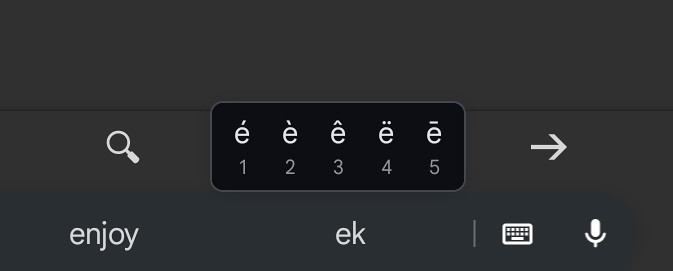
Pop-up window showing accented characters with e
(10 November 2026)
