Portable Power Supplies
Hinen PS3000 Portable Power Supply
Overview
The Hinen PS3000 is a portable power supply with a 3 kW inverter and battery capacity of 2.560 kWh. The inverter can handle a surge of 5 kW. This box is aimed squarely between the Ecoflow Delta 2 Max and the Ecoflow Delta Pro in this market.
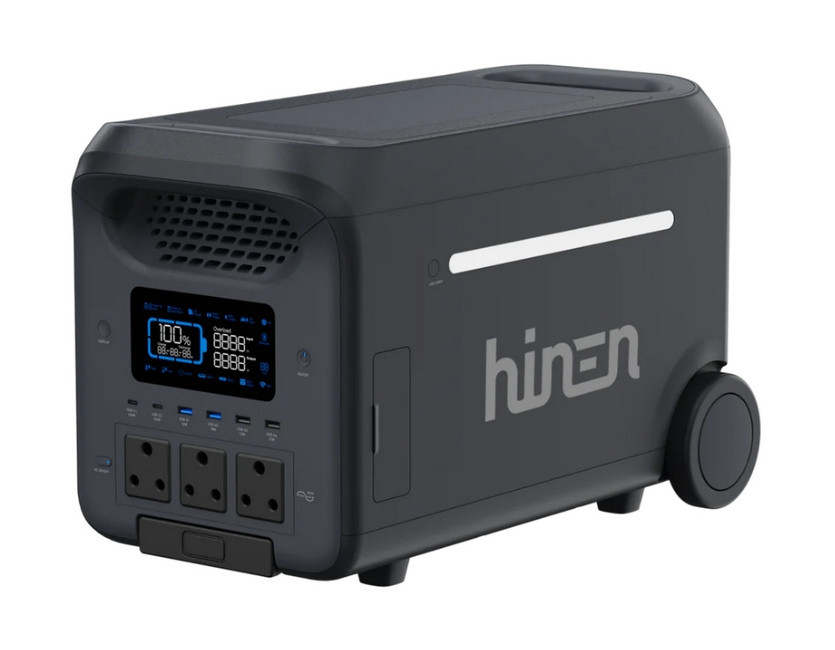
The Hinen PS3000
It has a pass-through charging mode with UPS capabilities and a switch over time of 14 ms.
The dimensions are 536×303×343 mm (w×h×d). It is a pretty hefty device, weighing 34 kg. It is fitted with the usual DC output ports and three ZA-type AC plug sockets. Solar input is via two DC7909 sockets.
Quick Links
Introduction
Load shedding has seemingly left us in South Africa. However, where I live in Pretoria we have suddenly become prone to extended power outages. These outages can last for fairly long periods and unless you have some kind of backup system, the outcome can be costly with regard to food in the freezer spoiling.
Up until now we have been fairly lucky in having the Bluetti EB70 to run the fridge/freezer in short bursts to keep the temperature down. With portable solar panels, the EB70 can be kept running for quite a while, providing there is sufficient sunlight. A disadvantage is that the fridge can discharge the EB70 very quickly.
This led to the search for something with a larger battery and a more capable inverter, not only to handle the fridge with ease, but also to cope with additional household loads during an outage. The requirement was not to run an entire house, but rather to cover the essentials reliably for extended periods.
The Hinen PS3000 fits into this space rather neatly. It offers a substantial increase in battery capacity over the EB70, along with a significantly more capable inverter. On paper, it promises to handle heavier loads such as kettles and induction cookers, while still providing enough reserve to keep critical appliances running.
Before settling on the Hinen, I did look at a few alternatives. The Ecoflow Delta 2 Max and Delta Pro were both strong contenders in this space, offering similar capabilities with well-established ecosystems. I also briefly considered going in a completely different direction with a small inverter generator from Gentech. In the end, I decided to stay with a battery-based solution — mainly for the simplicity, lack of noise, and the ability to integrate easily with my current solar panels.
This page is not intended as a technical review, but rather a practical look at how the PS3000 performs in day-to-day use — particularly under the somewhat unpredictable conditions of local power outages.
(updated: 4 April 2026)
Using the PS3000
A video clip on YouTube highlights some of the features of the PS3000.
Front panel
The front panel has an information display, a power switch, a display switch, six USB output ports, and three ZA-type AC plug sockets with a dedicated AC control switch.
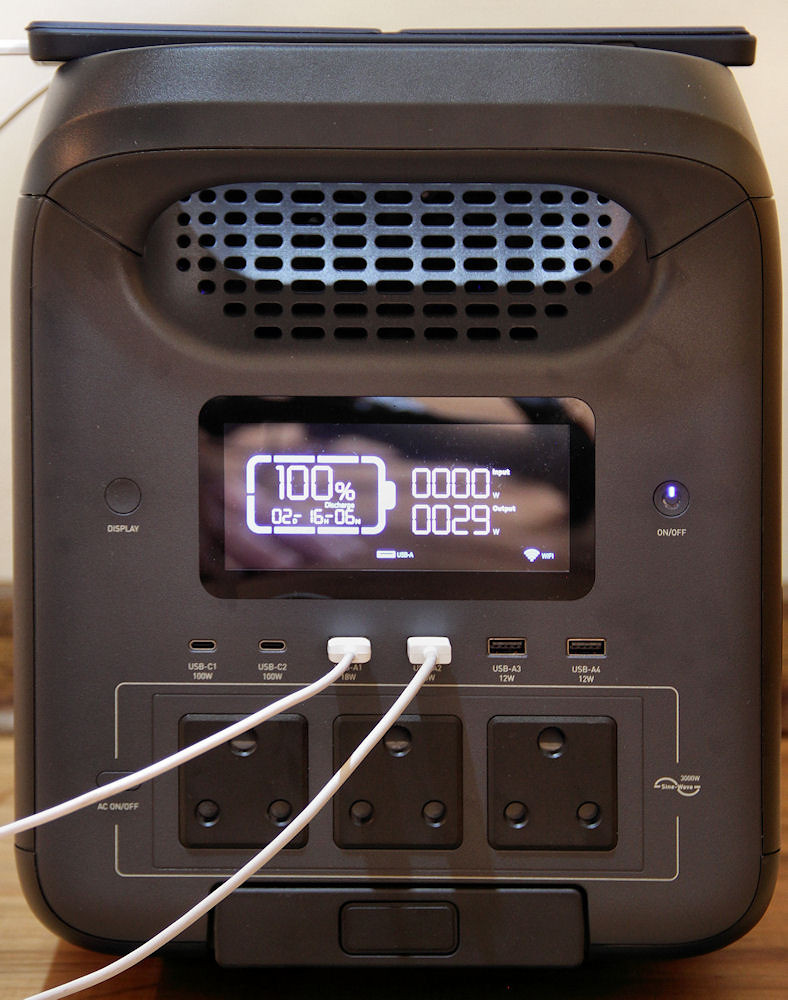
The front panel of the PS3000
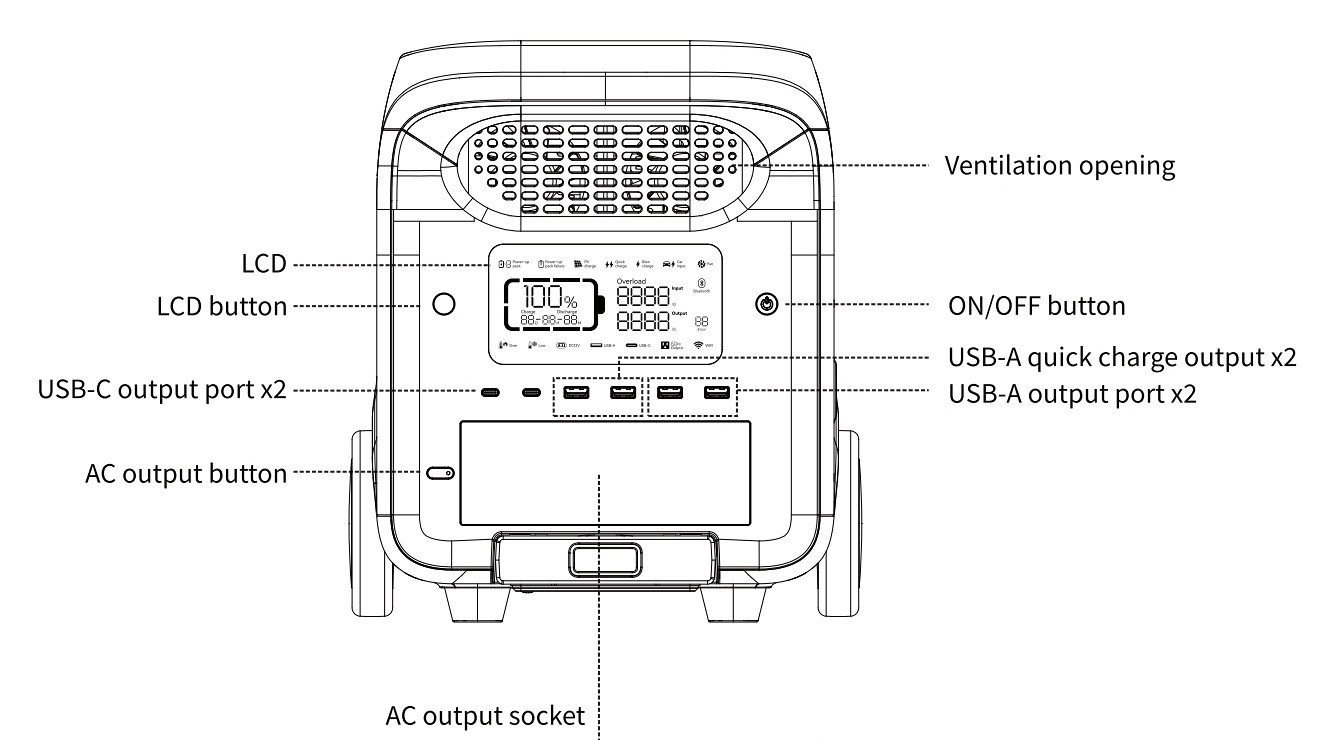
The front panel, from the manual
The display panel contains useful information, some of which is not available in the companion app.
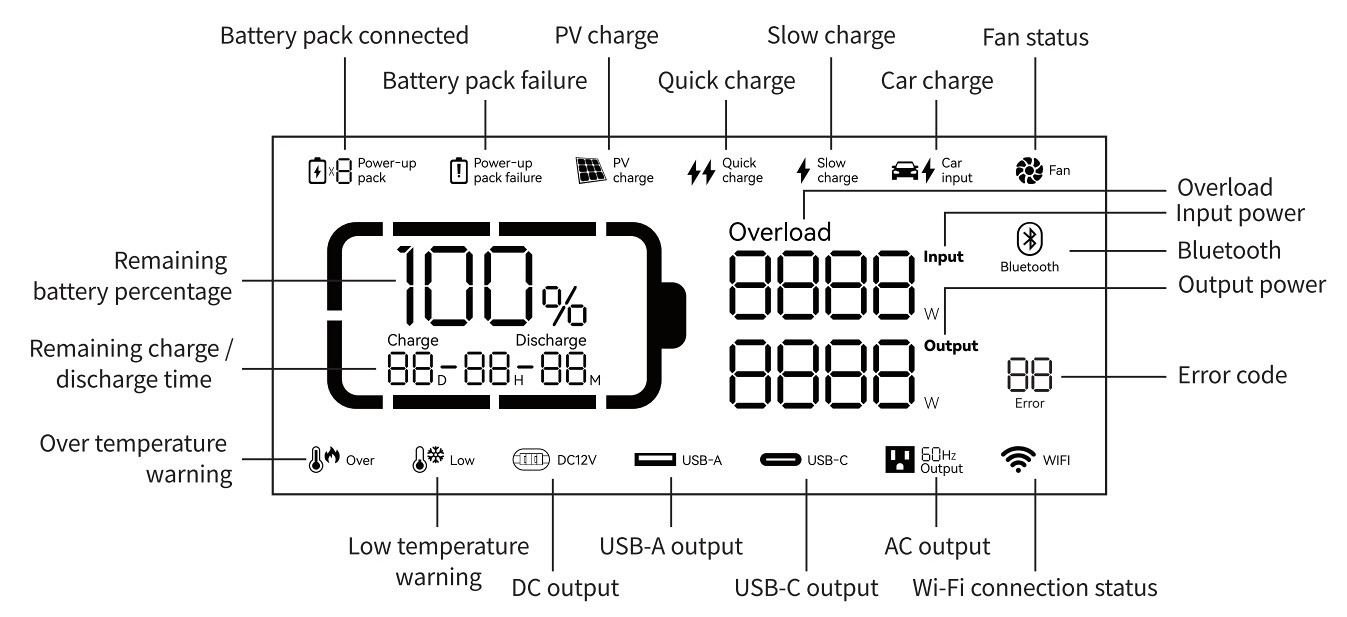
The display panel, from the manual
The ZA-type plug sockets are a useful feature as many brands have Euro-type sockets and supply an adapter — these adapters often block adjacent ports and add an unwanted protrusion to the unit.
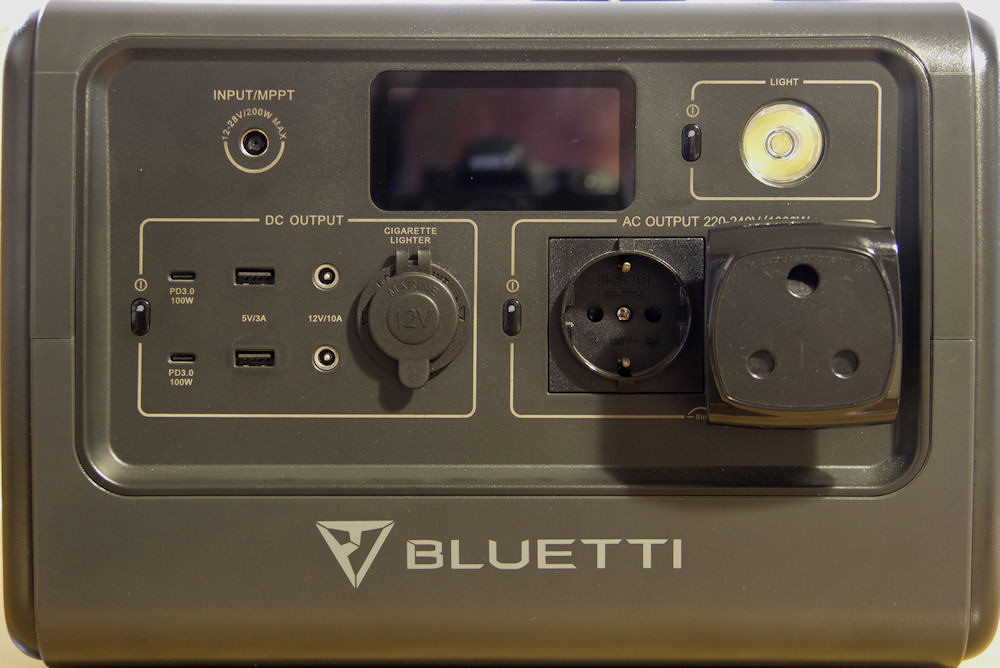
The adapter on the Bluetti EB70
Once the PS3000 is switched on, the display and the USB ports are activated. The default display timeout is five minutes, but this can be changed in the app.
The USB ports, from left to right:
- Two USB C ports (100 W max)
- Two "fast charge" USB A ports (18 W max - blue core)
- Two USB A ports (12 W max - black core)
There is no indication as to whether these maximum values apply per port or per pair. However, when charging both a Xiaomi Note 12 and a Samsung A9+ using the fast charge ports, the total output was 29 W (as shown on the display in a photo above). This suggests that each port can deliver close to its specified maximum.
This is useful when charging multiple devices simultaneously without needing to manage load between ports.
Rear panel
All input ports are located on the rear panel. These include an AC inlet and two DC7909 ports for solar or car charging (or a suitable DC-DC source). Plugging in a live source will automatically switch on the PS3000.
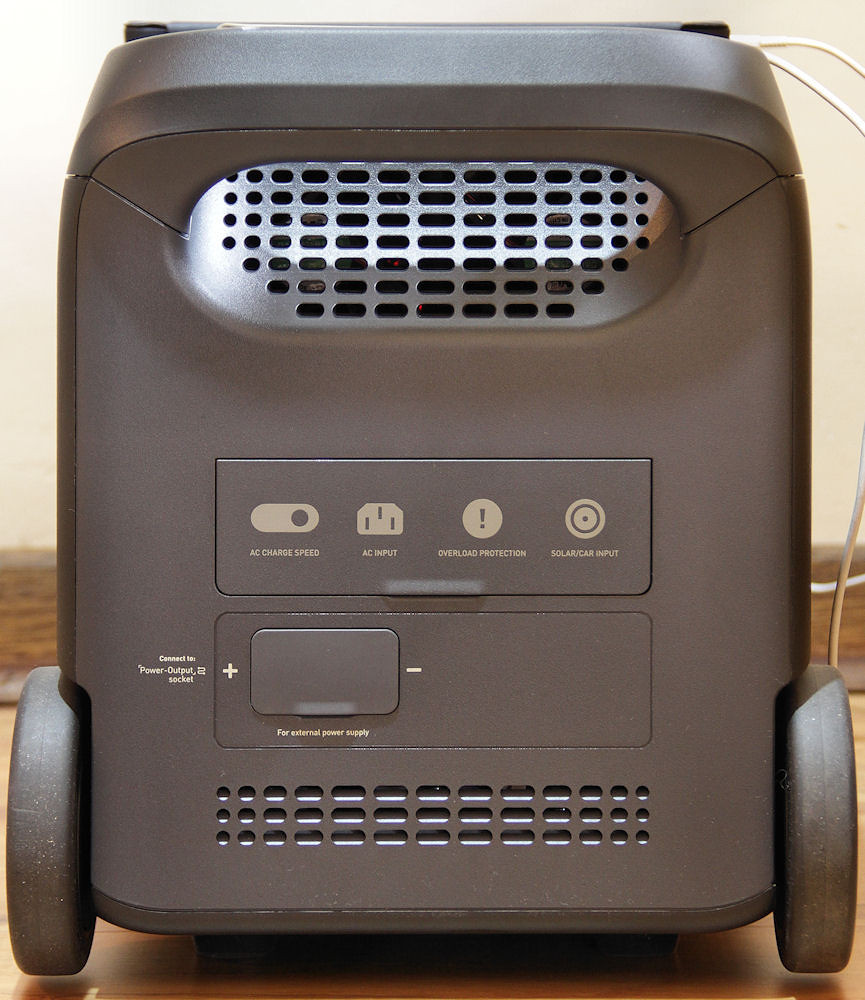
The rear panel of the PS3000
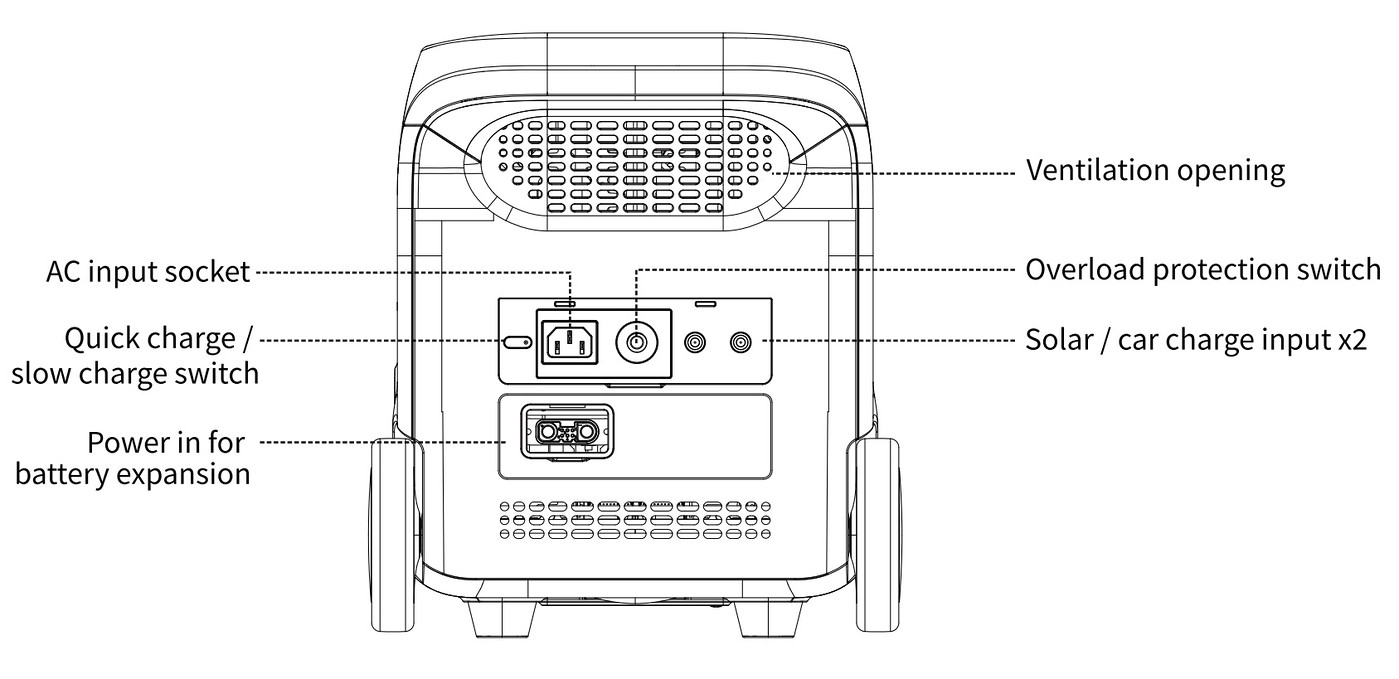
The rear panel, from the manual
As with the USB ports, the specifications for the DC7909 ports are somewhat ambiguous. The wording given is:
PV charge x2 800W Max., 13-45V ⎓ 12A
It is not clear whether the x2 applies to each port individually, or to both ports combined.
There is an overload reset button between the AC inlet and the DC7909 ports. From the somewhat vague wording in the manual, this appears to apply only to AC overload conditions.
Charging behaviour, including the AC charge control, is discussed below.
There is also an inlet socket for a Hinen PS2500B expansion battery.
Side panel
The DC output ports are behind a cover on one side of the PS3000
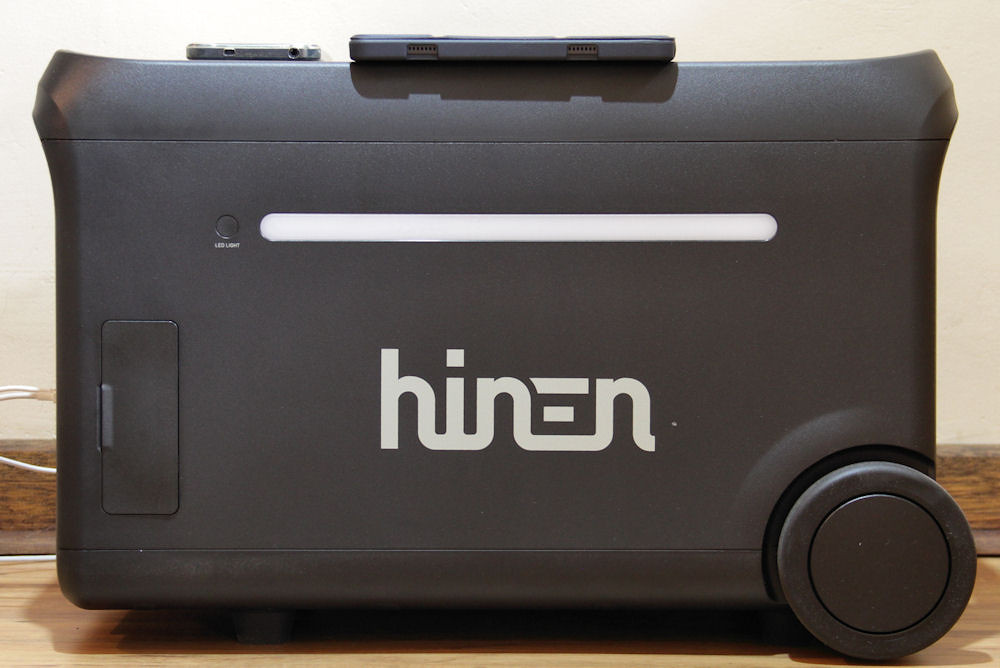
The side panel of the PS3000
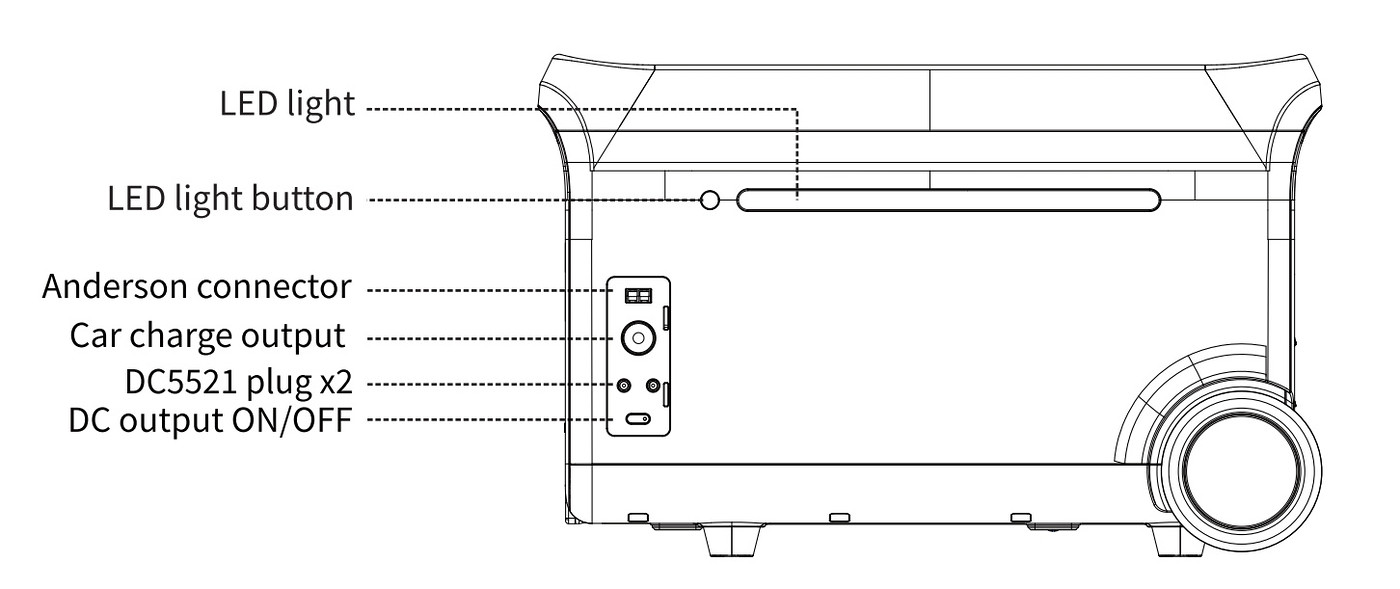
The DC output ports, from the manual
The outputs from these ports are (using terminology from the manual):
- Anderson terminal output: 12.6V ⎓ 30A max., 378W Max.
- Car charger: 12.6V ⎓ 10A, 126W Max.
- DC5521 output x2: 12.6V ⎓ 3A
Here, the manual is quite specific:
Car charge and DC5521 share power, 126W Max.
The "car charger" in this case refers to the cigarette lighter output socket.
This shared limit means that these outputs cannot be used simultaneously at their maximum ratings.
I have not yet tested these ports in detail. The only one likely to be of practical use is the cigarette lighter socket. This successfully charged the Jackery 500, but attempting to charge the Bluetti EB70 caused an overload error on the PS3000.
Update: I recently found a red/black Anderson (RB) to grey Anderson adaptor on Takealot. I already had a grey Anderson to DC7909 adaptor which I bought while testing the Enertech solar panel. This meant I could use the RB output to charge the EB70, as well as any other device requiring a grey Anderson connection.
One problem with the adaptor was that the polarity of the RB connector was reversed for the PS3000. Fortunately, slitting the heat-shrink covering the terminals allowed me to swap them around. After doing this, I was able to charge the EB70 without any issues.
What was interesting was that the PS3000 showed 111 W output while the Bluetti indicated 103 W input. The 111 W is well within the of 126 W maximum output rating of the cigarette lighter socket.
Timeouts
The following timeout behaviour should be noted:
- The unit will power down after two hours if there is no input or output activity.
- The inverter will switch off after one hour if there is no load.
- If devices with long standby times are connected, these timeouts may need to be adjusted in the app.
(updated: 30 May 2026)
Using the Hinen App
The Hinen app allows monitoring and control of several features of the PS3000. Setup requires creating an account and establishing a WiFi connection between the unit and the phone. Although a Bluetooth option is mentioned, I did not encounter it during setup. The WiFi connection allows remote access to the unit, provided it is already switched on — it cannot be powered on remotely.
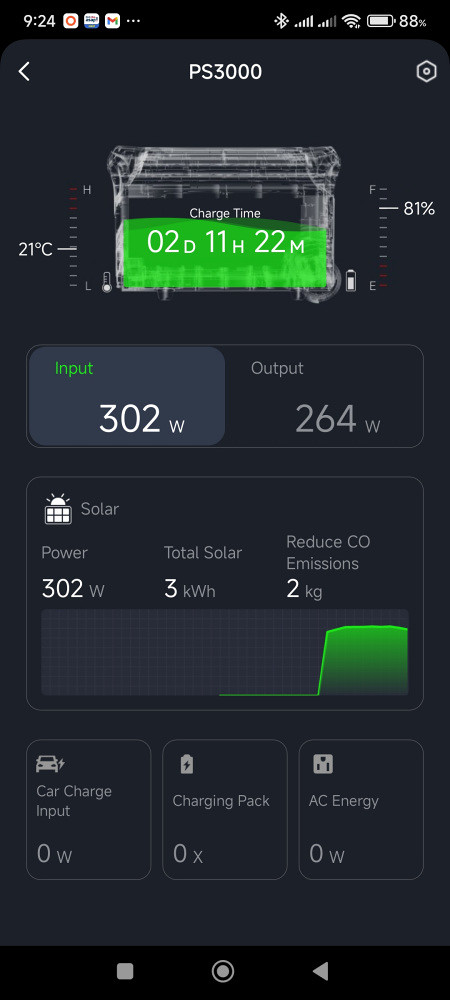
A typical opening screen from the Hinen app
The app uses a consistent layout across its screens, showing temperature, state of charge, and either time to full charge or estimated remaining runtime. This information is presented clearly and is generally easy to interpret.
With the Input tab selected (as shown above), information related to charging is displayed.
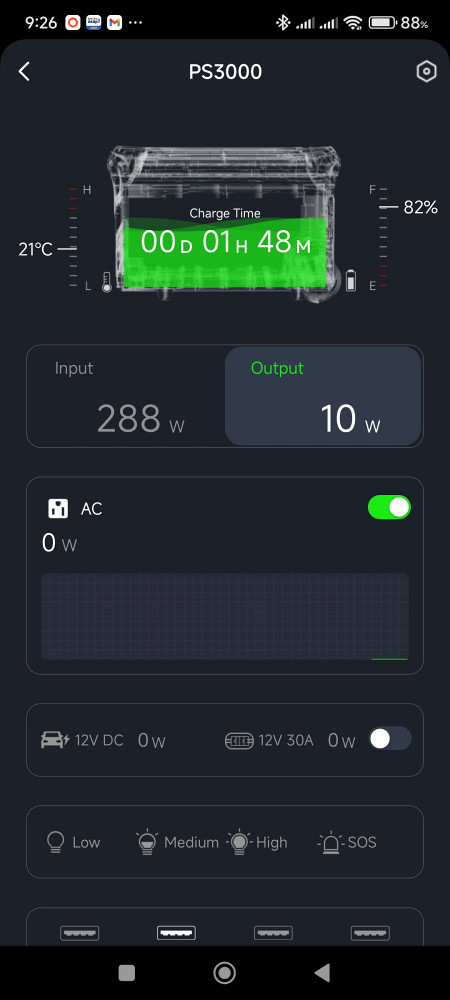
The Output tab selected
The Output tab provides access to the AC and DC control switches as well as the total power being used by each.
Scrolling further down shows which USB ports are currently in use, along with the power drawn by each.
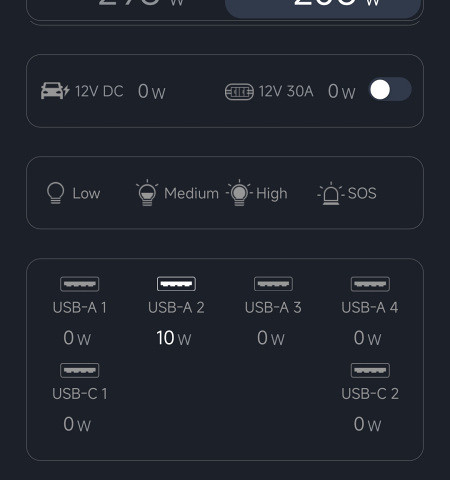
The USB ports being used
Note: The Charge/Discharge time estimates shown in the app are only updated while the display on the PS3000 is active. Once the display times out, the last estimate is retained. Other values continue to update.
Tapping on the settings icon (a nut) on the top right opens the settings screen.
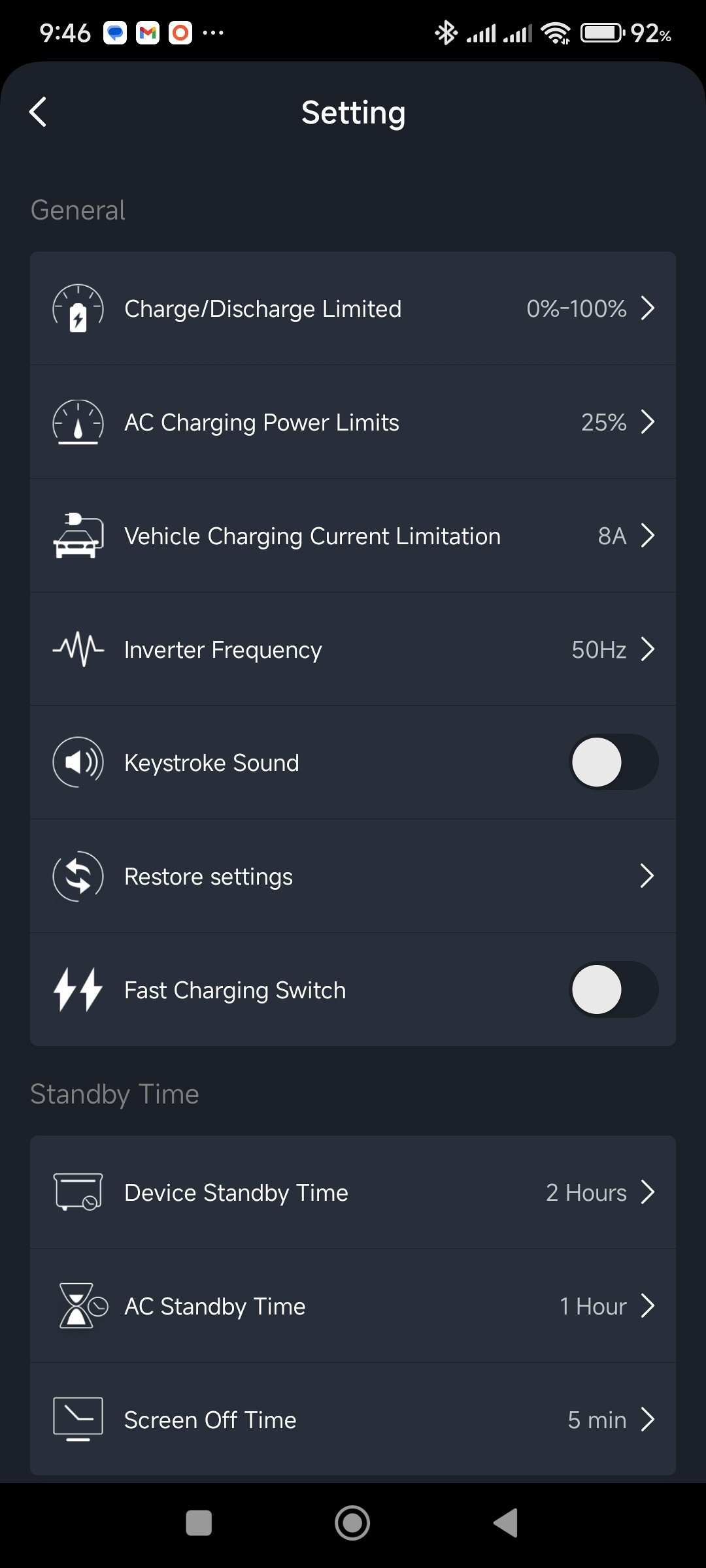
The Settings screen
Some aspects of these settings are discussed in more detail below.
(updated: 22 April 2026)
TV Test
The standard test I have used on all the boxes I have tried in the past is to determine whether the battery capacity lives up to its advertised value. With the smaller units, this was particularly important during load shedding, where they needed to last at least two hours under the load of the system.
This test system consisted of a Sony Bravia TV, a Hisense 2.1 Sound Bar, a Xiaomi Mi TV box (first generation), and a hearing aid audio transfer box (there was also a Samsung Blu-ray player, in standby mode, connected). Together, these devices drew 157 W while the TV was in use (measured with a standalone power meter). The Mi box has since been replaced by a Netogy Nova Pro streaming box, and the system now draws 156 W.
Due to the size of the battery in the PS3000, it was not practical to run a single full discharge test — this would require over 16 hours of continuous measurement. Instead, the test was carried out over several sessions, starting from different states of charge (SoC).
The results showed a high degree of linearity across most of the discharge range.
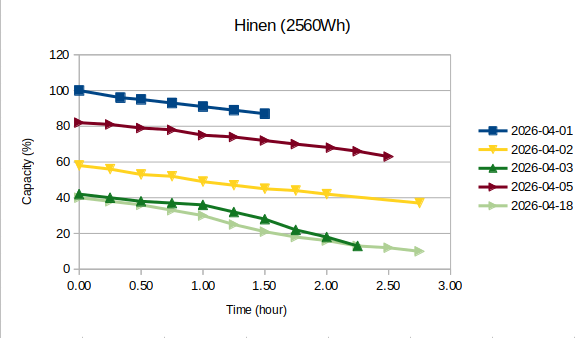
Five sets of data
Update An additional data set starting at a low SoC (light green) has been added.
Three of the curves are linear with similar gradients, while the dark green curve shows noticeable deviation below an SoC of 35%. The light green curve begins to deviate earlier, but then stabilises and follows a similar gradient to the other curves, offset to a lower SoC.
The first dataset (dark blue) was highly reproducible across repeated tests. From this curve, the following linear equation was calculated:
where Sc is the SoC, and t is the time in hours. This gives an apparent initial state of charge of 99%, due to the startup of the box.
Rearranging to make t the subject of the formula:
Using this formula, each segment can be shifted to its correct position on the graph by using the starting SoC of the segment.
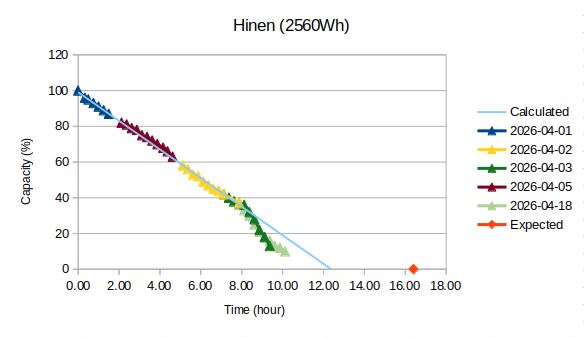
Each set of data shifted into position relative to its initial SoC
The light blue line represents the equation for Sc given above. Due to the smaller scale, the deviation of the green curves are more pronounced, while the other curves follow the expected relationship closely.
Discussion
The following results were obtained from the graph:
- Expected run time: 16.4 h
- Calculated run time (light blue line): 12.4 h
- 76% of rated capacity
This would have been an acceptable result for a unit of this size. However, the behaviour of the dark green curve indicates that this is not representative of the full discharge range, with the unit appearing to reach 0% SoC after just over 10 hours.
- Expected run time: 16.4 h
- Achieved run time (dark green curve): 10 h
- 61% of rated capacity
This is a disappointing result. I have since repeated this test (shown by the light green curve) and found that it now appears as though a 0% SoC will be reached in just under 12 hours. This is a significant improvement over that shown by the dark green curve.
- Expected run time: 16.4 h
- Achieved run time (light green curve): 11.5 h
- 70% of rated capacity
The variation between these results suggests that the behaviour at lower states of charge is not consistent, and may be influenced by the way in which the state of charge is determined.
It is also worth noting that the PS3000's own runtime estimate at 100% SoC was approximately 13.5 hours under this load. This corresponds to roughly 82% of the expected runtime, suggesting that even the unit's internal calculations do not reflect the full rated capacity.
Interestingly, even at a reported 10% state of charge, the unit continued to estimate a total runtime of approximately 13.5 hours under the test load. Although this estimate is derived from the reported state of charge, its stability suggests that the internal capacity model used for runtime estimation is more consistent than the displayed state-of-charge value itself.
(updated: 20 April 2026)
Appliance Test
Apart from the TV test discussed above, I also tested several household appliances.
Samsung Side-by-side Double Door Fridge/Freezer
Because of the food stored in the freezer, this fridge is the most important appliance needing back-up power.
Immediately on starting the fridge, a large 1.6 kW spike occurs. This is so rapid that neither my standalone power meter, nor the Bluetti EB70's power meter could register it, but the PS3000's meter did. In view of the size of this spike, I am surprised that the EB70 could run the fridge.
The fridge usually takes about 10 minutes after being switched on before the compressor starts running (regardless of the temperature of the fridge or freezer). Once the compressor starts, the power draw is over 400 W. This decreases to a running level of around 130 W.
The PS3000 handles this load with ease.
While testing this fridge, I also tested the pass-through and UPS capability of the PS3000. With the recent power outages in our area, I needed to be sure that the unit could keep the fridge running when we were away.
The test was straightforward — the PS3000 was connected to the mains, with the fridge (and alarm system) powered from the unit. Once the compressor had been running for a few minutes, I switched off the mains supply to simulate a power outage, and restored it after a short interval. This was repeated three times.
- 1 Off: Audible click from fridge.
- 1 On: Slight shudder from fridge.
- 2 Off: No effect.
- 2 On: No effect.
- 3 Off: Shudder from fridge and PS3000 fan started.
- 3 On: No effect.
The compressor continued running throughout all tests, and the power meter on the unit showed no noticeable variation in output. The alarm system was unaffected.
These results suggest that the UPS switching time (rated at 14 ms) may be a bit long for the fridge, even though it does not interrupt operation.
In practical terms, this behaviour is unlikely to pose any risk to normal operation, but it does indicate that the switchover is not completely seamless for this type of load.
Bosch Serie 4 7 kg Washing Machine
This was the most aggressive of my tests, but I needed to know whether the PS3000 could handle the load, as this was one of Pat's prerequisites. This washing machine is rated A+++, so I expected it to be quite efficient as far as power consumption was concerned.
My test was as simple as running a 60°C "Speed-Perfect" cycle on the washing machine to see how the box would handle the load.
At the start, with the water flowing in and the drum doing its first rotations, the initial power draw was 56 W. This then varied between 24 W and 180 W until the heating cycle started.
The heating cycle drew a maximum of 2.3 kW and remained steady between 2.0 kW and 2.3 kW.
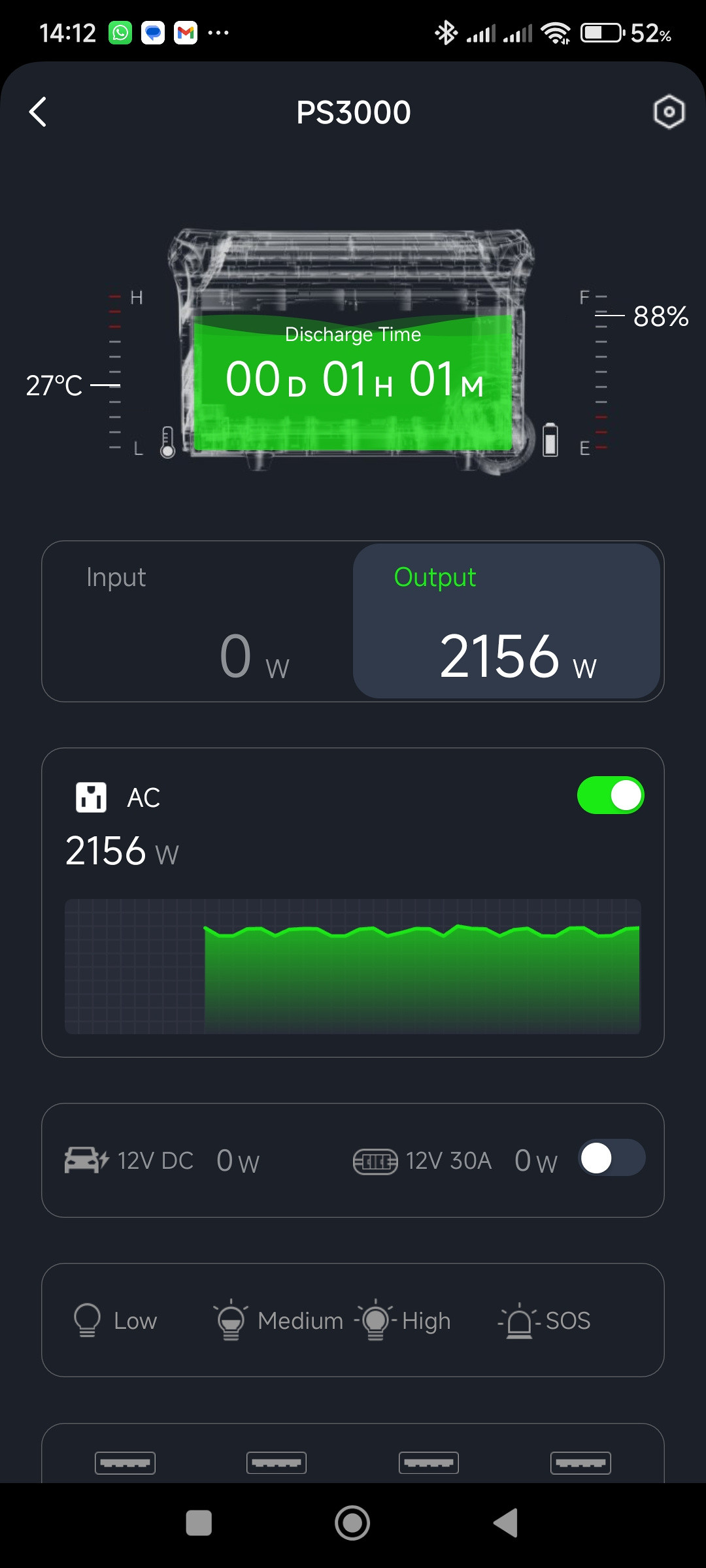
Showing part of the heating cycle from the Hinen app
At the end of the heating cycle, the power dropped down to around 163 W
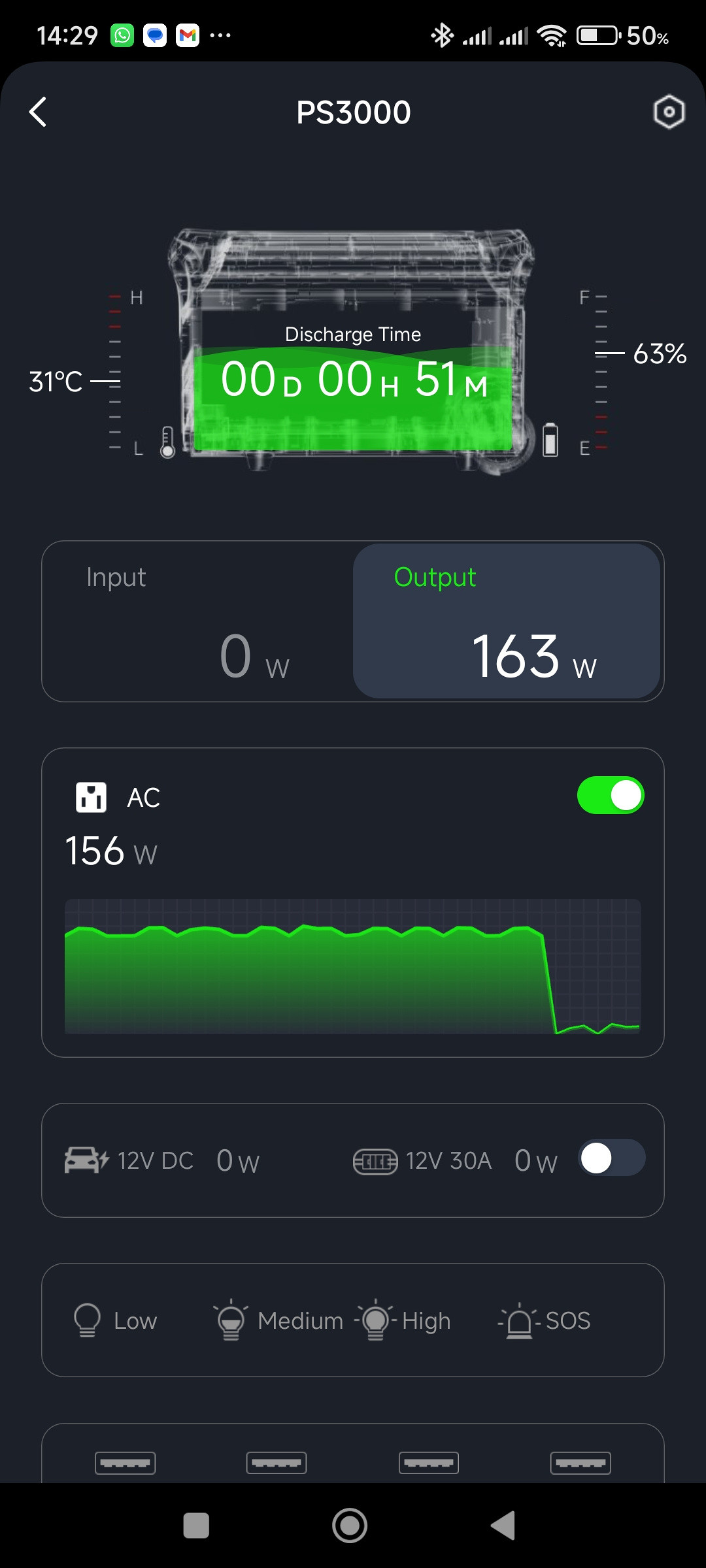
Showing the end of the heating cycle from the Hinen app
With the final spin, the power reached a maximum of 248 W — this is far less than I expected.
In spite of the high power draw during the heating cycle, the fans remained surprisingly quiet. As shown in the image above, the internal temperature was only 31°C, which was consistent with the relatively cool exhaust air from the vents.
The whole cycle lasted one hour, and the total power used was 42% of the battery capacity. This was a better outcome than expected.
Snappy Chef Induction Cooker
This was another fairly aggressive test, as the electromagnetic induction coils in the cooker switch on and off rapidly at lower power settings. I tested the PS3000 while making my Fish Frikkadel recipe.
The way I use the cooker during this recipe is on level 3 to fry the onions and fish, then on level 4 to fry the frikkadels. Level 3 uses very rapid switching, with the power level jumping between a low value (possibly 0 W — I could not determine this accurately) and 1.243 kW.
The frikkadels were then fried on level 4, where the power draw remained steady at 1.271 kW. This suggests either that the switching time is too fast to register, or that from level 4 upwards the electromagnet operates continuously.
The PS3000 had no problems handling rapid power switching of the induction cooker. During the 30 minute cooking time, 15% of the battery capacity was used. This equates to roughly 6–7 full cooking sessions from a full charge under similar conditions.
Other appliances
Although these were not part of my formal tests, I did record some data while using a few higher-powered appliances.
Vacuum Cleaner: I used the PS3000 to power a Genesis Hydrovac while cleaning the house when I was trying to reduce the available capacity to below 40% for my TV tests. The vacuum cleaner drew a peak of 1.25 kW at startup before settling at about 1.12 kW while running (rated maximum power consumption 1.6 kW).
Power washer: While cleaning the patio with the Trade Pro HP2000, I used the PS3000 as the power source. Although the HP2000 has a rated maximum power consumption of 1.8 kW, it drew a peak of 1.3 kW at startup and about 1.2 kW while running. I cleaned the patio (8 × 6 m2) in two sections — one used 32% of the battery charge (~625 Wh), while the other, which included soaping with the foam cannon, used 28% (~546 Wh).
In both cases, the PS3000 handled the loads without blinking — and using solar to recharge the battery reduced the cost of the exercise appreciably. My next major test will be running the power washer and the JoJo pump simultaneously to see how the PS3000 performs.
Unfortunately, the PS3000 failed to run the JoJo pump (Aqua Duty AQD158M), giving an immediate Error 14 — Abnormal INV output.
I have since found that the pump has a startup/inrush current of between 15 and 17 A. As the maximum AC output of the inverter on the PS3000 is 16 A, it is easy to understand why it could not start the pump, despite its relatively low 1.1 kW maximum run-time power requirement: the pump's startup current is right on the limit of the inverter's output capability.
1 September 2026
(updated: 7 June 2026)
Charging
AC charging
On switching on the PS3000 for the first time, it showed a 96% SoC (which I thought to be quite high for a new device) so I decided to fully charge it before doing any tests. The charging rate was 860 W which also felt rather high, as a new box was supposed to be capped at a low level by default even though the "quick charge" button was enabled. All buttons and sliders related to charging in the app were disabled. This worried me somewhat on reading the following in the manual:
The slow charge mode is on by default when power station is turned on, and can be switched to quick charge mode by the button.
However, switching off the quick charge button on the unit caused the corresponding control in the app to become active, along with the charging rate slider.
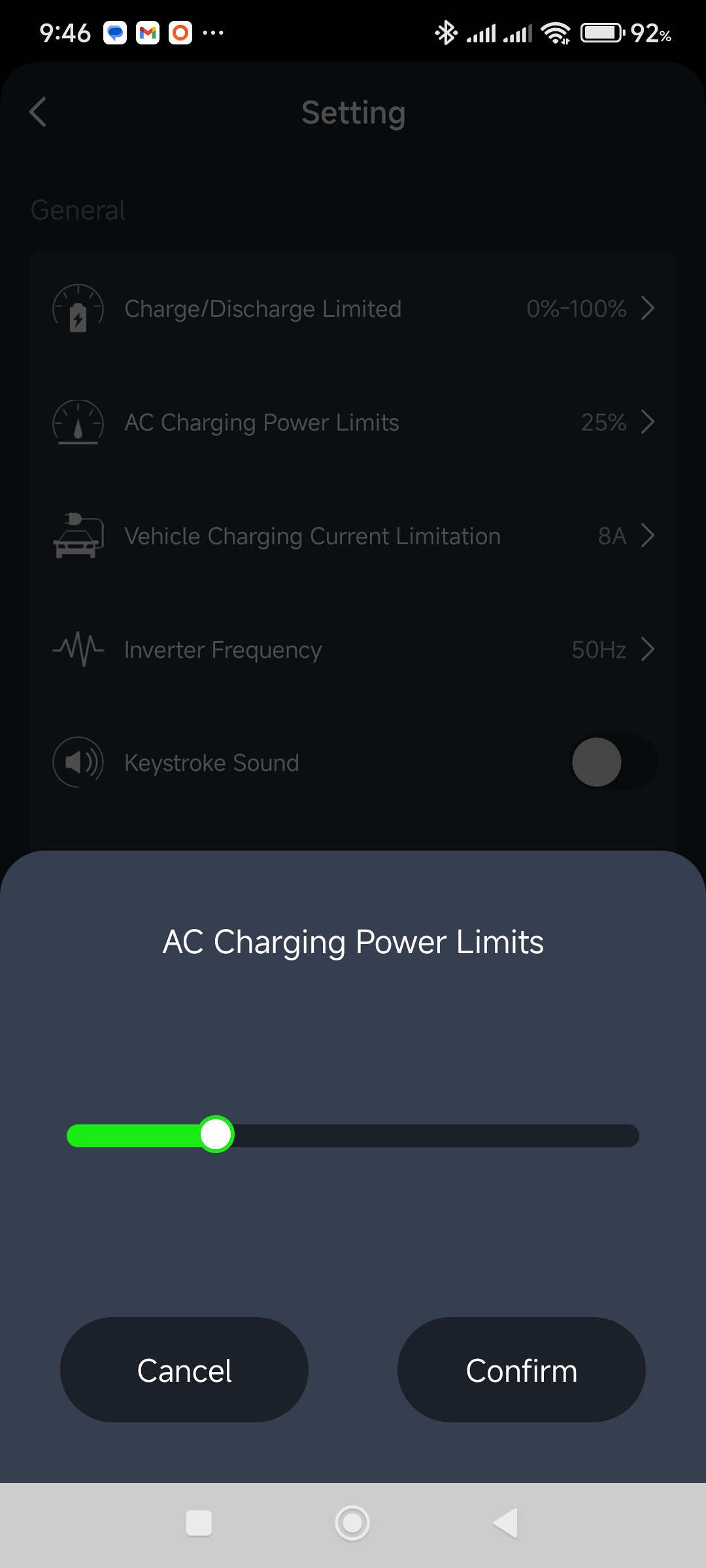
The slider in the AC Charging Power Limits set to 25% in the Hinen app
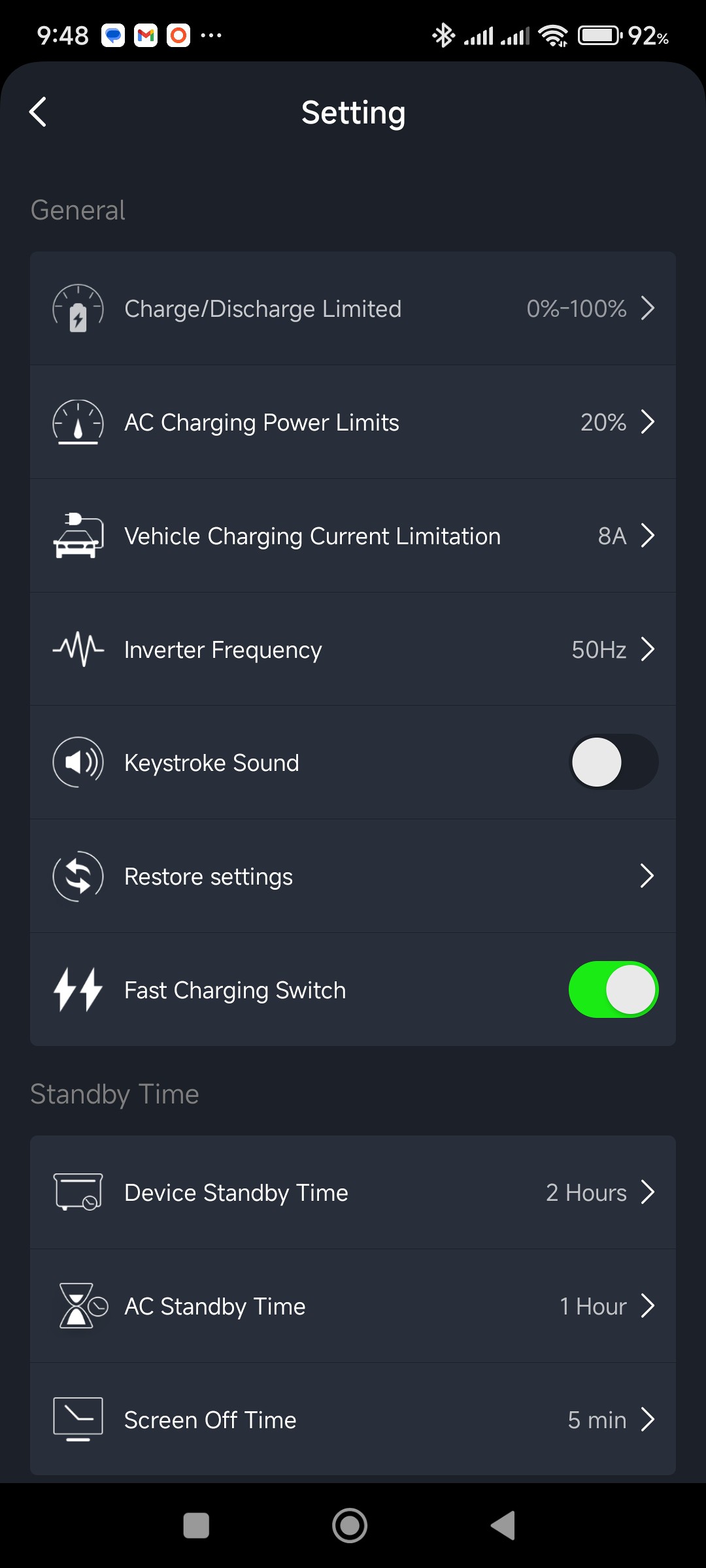
The Fast Charging Switch activated in the Hinen app
Slow charge is capped at about 330 W (this value does vary somewhat), which feels like a fairly safe value to me. It can be scaled down using the slider control in the app as follows:
- 100%: 330 W
- 75%: 275 W
- 50%: 187 W
- 25%: 114 W
The maximum input power from quick charge is 1.960 kW (but this also varies). The power levels can be scaled down in the app as follows:
- 100%: 1960 W
- 75%: 1500 W
- 50%: 1006 W
- 25%: 532 W
- 20%: 432 W
- 10%: 340 W
The value set on the slider control in the app applies to both the quick and slow charge modes.
In practical terms, this makes it possible to run the unit comfortably from lower-capacity AC sources by limiting the input power.
I am not in favour of charging Li batteries at an excessively high current, and would therefore prefer to keep the input power below about 400 W.
Solar charging
The PS3000 has two DC7909 input sockets for solar or car charging, which fits in well with the solar equipment that I already have, particularly the DC7909 extension cables.
I tested various configurations for solar charging with the portable panels that I have — 2xBluetti PV200 (200 W) and a Jackery Solar Saga 100 (100 W). On my solar panel page, where I discuss these panels, I have found that the efficiency of these panels is between 67% and 70% under good solar conditions. This means the best I can expect is about 70 W from the Jackery panel and about 140 W from each of the Bluetti panels.
Results from the PS3000:
- Jackery: 74 W
- Bluetti: 145 W
- Bluetti and Jackery: 215 W
- Two Bluettis: 283 W
These results are broadly in line with the expected output based on earlier panel testing, if anything slightly better. The combined results of the Jackery and Bluetti also suggest that mixing panels of different sizes works as expected.
The PS3000 also supports simultaneous solar and AC charging. I tested this with the unit in "slow charge" mode:
- Two Bluetti panels: 272 W
- Two Bluetti panels plus AC charging: 602 W
According to the specifications, the box can handle 2.688 kW input from combined solar and AC charging.
One interesting observation was that the fans are noticeably louder during charging than when running a load. Under variable solar conditions this can become somewhat irritating, with the unit switching from almost silent below about 80 W input to sounding like a small jet engine warming up at around 330 W.
Although the unit supports up to 800 W of solar input, the 45 V maximum input voltage significantly limits compatibility with standard high-wattage residential panels, many of which exceed this voltage. Care must therefore be taken to select panels that remain within this limit, particularly when connecting panels in series.
In practical terms, the PS3000 works well with portable panels, but is less suited to integration with typical residential solar panels without careful selection.
The use of DC7909 connectors for the solar inputs may also impose practical limits. While adequate for typical portable panels, these connectors are not ideally suited to higher current setups, which further reinforces the focus on portable rather than larger residential-style solar configurations.
Car charging
Due to the size of this box, I doubt very much that I would use it for our style of camping, so vehicle charging is not really an issue.
Although Hinen refers to "car charging" and "solar charging," the DC7909 input connector is identical in both cases. The PS3000 must therefore determine what is connected from the electrical characteristics of the input, most likely the input voltage, rather than from the connector itself.
The PS3000 limits charging from a vehicle to approximately 8 A. This is important because a typical vehicle cigarette lighter socket is usually fused at 10 A or 15 A. By staying below 10 A, the PS3000 avoids overloading the circuit and can be safely charged from the cigarette lighter sockets without blowing the fuse.
In order to test the car charging cable, I used the cigarette lighter port on the Bluetti EB70. The EB70 showed 103 W going out, while the PS3000 showed 95 W going in. The EB70's cigarette lighter socket is regulated at 12 V, which equates to an output of around 8.6 A. The PS3000 indicated a draw of about 7.9 A (this is assuming the readout values are reasonably accurate — I do have some reservations about the EB70's readings).
Reducing the allowed current in the Hinen app from the default 8 A to 4 A did not appear to have any effect on these values, which suggests that either the setting is not applied in this mode, or the input is already limited.
Andy has answered some of these questions. The PS3000's car charging cable has the centre pin of the DC7909 connected to the negative (outer) conducting sheath of the plug. When the PS3000 detects this, the current is automatically limited to 8 A by the charging circuitry.
In my experiments, I have used the PS3000's car charging cable when using the cigarette lighter port to charge another box. I will have to repeat these experiments using the other box's own car charging cable.
2 September 2026
In practical terms, car charging at around 100 W would be of limited use for a unit of this size, and is best regarded as a fallback option rather than a primary charging method.
(updated: 15 May 2026)
Concluding Remarks
Inverter
I am very impressed with the inverter in the PS3000. It handled most of my real-world tests with ease. Even with the inverter running at more than 70% of its rated load capability, the fan was relatively quiet.
Battery
The battery is a disappointment. The rated capacity of 2.560 kWh appears to be more of a marketing figure than a realistic value. My measurements indicate a usable capacity between 1.560 kWh and 1.950 kWh, while the unit's own runtime estimates suggest a figure of around 2.100 kWh.
Overall
Despite the apparent overstatement of battery capacity, the PS3000 still represents reasonable value when compared with similarly priced units, particularly as it works seamlessly with the solar equipment I already own.
For my use, it is worth keeping.
I did contact the manufacturer by email regarding the THD of the device and the warranty period, but have not yet received a response.
(updated: 20 April 2026)
Footnote
The following image highlights the lack of attention to ergonomics in the design of these larger power supplies. To comfortably view and use the controls and display, the box needs to be raised to a convenient height. Given the weight, this requires two people to lift it, along with a suitably sturdy platform on which to place it. In practice, the box is most likely to be used while standing on the floor.
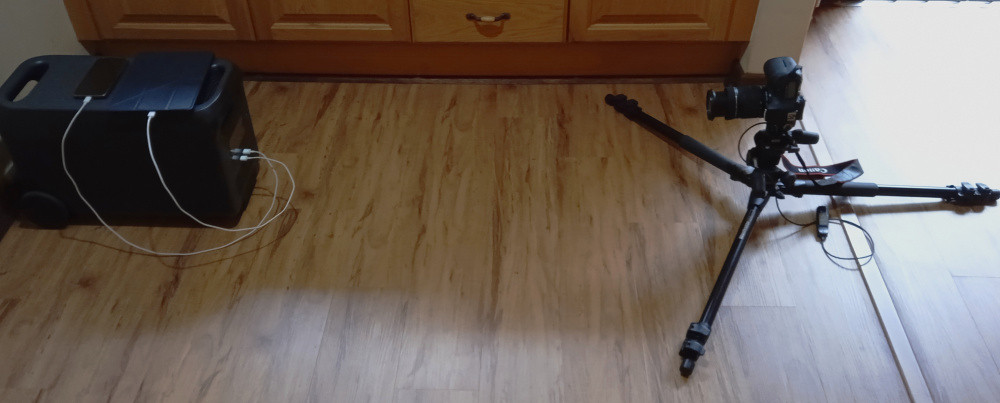
Setup used when taking some of the photographs
Many reviewers highlight the advantages of touch screens on newer boxes. However, as the image above illustrates, viewing or interacting with the display in this position is awkward at best. Even using the camera viewfinder (positioned at a similar height to the display) proved uncomfortable when taking these photographs.
A fold-out or angled display would go a long way towards improving usability, and even a top-mounted control panel could make sense — there may be thermal considerations with such an approach, although the cooling systems in these boxes would suggest that this should be manageable.
(updated: 14 April 2026)
Back to Portable Power Supplies.
