Portable Power Supplies
A Question of Nomenclature
There are a surprising number of names used for these devices — some technical, some descriptive and some clearly invented by marketing departments. Before continuing, it is worth discussing a few of these terms and explaining why I have chosen to use "power box" throughout this website.
Portable Power Station (the industry standard)
The term portable power station is largely a marketing invention. Traditionally, a power station generates electricity. These devices do not generate electricity—they store it in a battery and then convert and distribute it through their various outputs.
Portable Power Generator (or solar generator)
These devices do not generate electricity, so the term portable power generator is even harder to justify. Some manufacturers go a step further and describe them as solar generators. Unless a solar panel is included as part of the system, there is nothing inherently solar about them. Even then, it is the solar panel that generates the electricity; the box merely stores, converts and distributes it. Like portable power station, this feels more like a marketing term than a technical description.
Portable Power Supply
Although the term power supply has different connotations in the electronics industry, I feel that its use here is perfectly acceptable. It describes exactly what the device does — it delivers power, in the form of stored electricity, that can be put to practical use.
Power Box
The reason I prefer the term power box is that, at the end of the day, that's all the device really is: a box containing a battery and enough electronics to charge it and safely convert and deliver electricity in different ways.
Whether you prefer portable power station, battery power station, solar generator or something else entirely, you'll know exactly what I mean when I say power box — and it saves me a lot of typing.
12 July 2026
Introduction
This page has been updated as it moved from being a guide to surviving load shedding to a long-term review of the power boxes that I have owned and tested.
Between 2022 and 2024, South Africa experienced prolonged periods of "load shedding", where electricity was deliberately switched off to different areas to prevent the national grid from collapsing. Like many South Africans, I started looking for an alternative source of power for essential household equipment.
My original requirement was to keep the television, Internet connection and computer running during outages. A secondary requirement was that the same unit should also be capable of running a camping fridge, making it useful both at home and while travelling.
Over the following few years I owned, tested or evaluated several different power boxes. Some performed well, while others fell well short of their advertised specifications. This page is a summary of those experiences, together with links to more detailed reviews where appropriate.
Rather than relying on laboratory measurements, I tested each unit under the same real-world conditions. My test load consisted of a Sony television, Xiaomi Mi Box and Hisense 2.1 soundbar, together drawing approximately 157 W as measured with a Geewiz power meter. Each power box was fully charged and then run until it switched itself off. This allowed the different units to be compared under identical conditions.
Every unit reviewed here was purchased with my own money. Any products that failed to meet the manufacturer's published specifications were returned within the supplier's return period. None of these reviews are sponsored.
(updated: 24 July 2026)
Powering the Internet
Mini DC UPS - POE-431P (8800 mAh)
During load shedding it was necessary to maintain a stable Internet connection. I could not simply use a power box because the fibre equipment is in my study, some distance from where backup power was mainly needed elsewhere in the house. An independent power supply for the fibre ONT and router therefore made more sense. Francois recommended the POE-431P Mini UPS from his own experience.
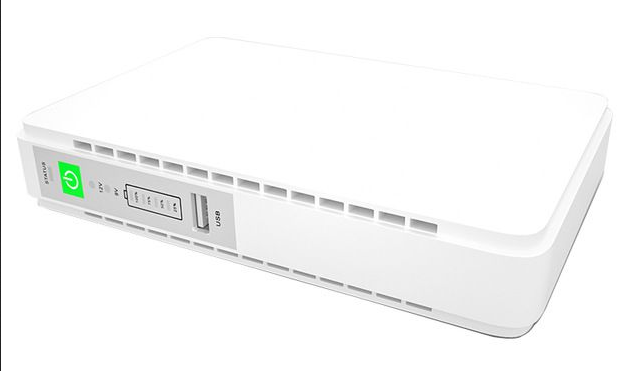
The Mini DC UPS
The device has a single DC5521 barrel-plug output and is supplied with a short splitter cable. I also needed a DC5521 extension cable (sourced from Geewiz) to reach the router.
One limitation of the POE-431P is that it can output only 9 V or 12 V. My ONT required 12 V while the Mercusys AC12G router was rated for 9 V. Fortunately, the ONT operated reliably at 9 V, whereas the router would not. Setting the UPS to 12 V solved the problem.
When new, the box could handle a four-hour session of load shedding with ease. However, the repeated rounds of load shedding took their toll. After almost exactly one year, the box could no longer last through a two-hour outage. It was time to find a replacement.
(updated: 25 July 2026)
Mini DC UPS - Netogy UPS-100PLUS (14400 mAh)
After a good deal of research, I settled on the Netogy UPS-100PLUS mainly because of the LiFePO4 battery, its higher capacity and overwhelmingly positive reviews on Takealot.
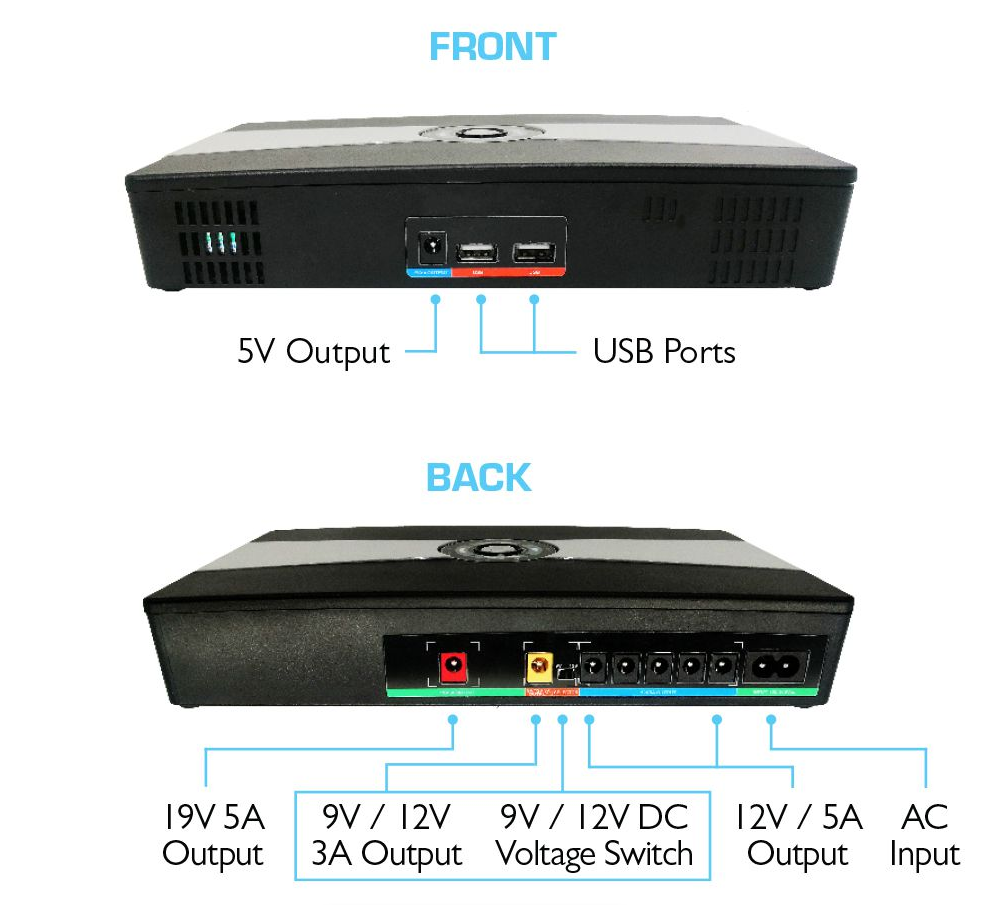
Netogy UPS-100PLUS
The UPS offers a useful number of output ports. Compared with the POE-431P, this device is huge — it is almost the size of a netbook, whereas the POE-431P is closer to a cellphone power bank. It is also considerably heavier, no doubt because of the LiFePO4 battery.
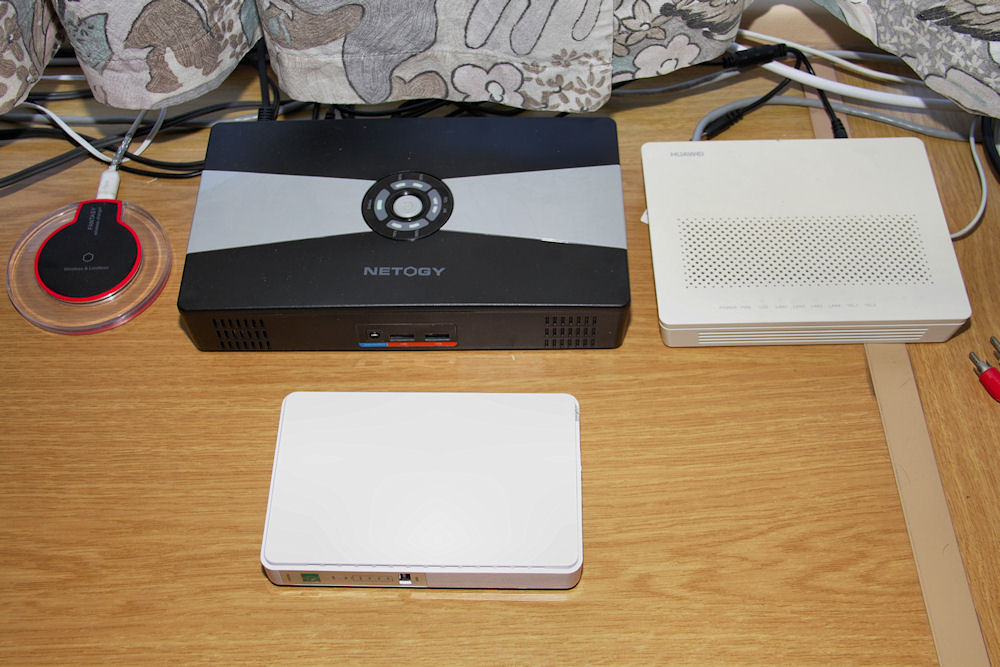
A size comparison: Netogy UPS-100PLUS, Huawei ONT and the POE-431P
Unlike the POE-431P, the dedicated 9 V output powered the Merusys router without any issues. During testing, the UPS ran the ONT/router combination for more than 5½ hours, far exceeding my expectations.
An electrical storm in early 2024 took out both the UPS and the router (but strangely enough, not the ONT), in spite of having surge protectors in the AC input line. While waiting for replacements, I reconnected the POE-431P and a very old D-Link DSL router to keep the Internet connected. The replacement UPS-100PLUS and Mercusys AC12G have operated flawlessly ever since.
(updated: 26 July 2026)
Ecoflow River Max (576 Wh)
The Ecoflow River Max is an Ecoflow River (288 Wh) box with an expansion battery added to take the capacity up to 576 Wh. It is a really well designed device having a useful number of output ports for both AC (220 V) and DC (both 12 V as well as cellphone charging ports). The input ports are 220 V AC (standard kettle plug) and 12 V (with adaptors for both solar and car cigarette lighter). Charging is very quick with the Ecoboost enabled. The companion app allows you to control the device from your phone, although it did require creating a user account with Ecoflow in Hong Kong. It has "UPS" functionality (30 ms) which was adequate for my TV test system.
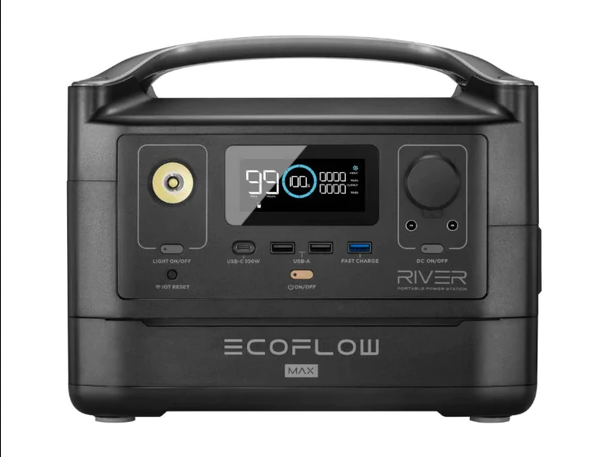
The Ecoflow River Max
Unfortunately, the device did not measure up to the rated battery capacity. The first unit delivered less than half of the claimed 576 Wh (under 2 h at 150 W), which makes me believe that one of the battery banks was not working. This unit was returned. The replacement did marginally better at 2.5 h with the meter showed my test system drawing 160 W. At 160 W output, the batteries should have lasted for 3.6 h.
I did not record the power usage on the first box, but I did do two sets of measurements on the second box.
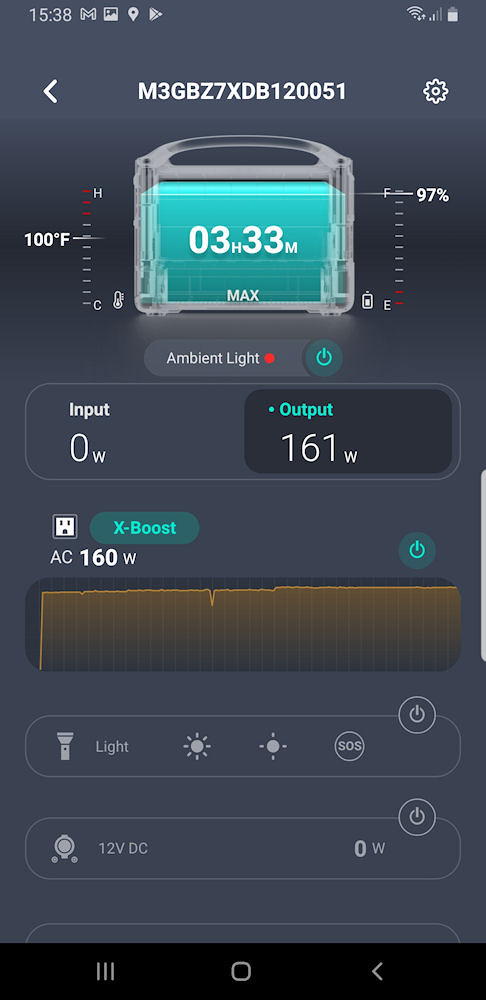
Screenshot from the app
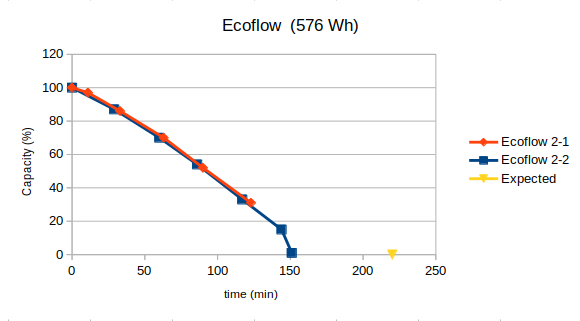
Power usage on the second Ecoflow
For consistency, the expected run time was calculated using the 157 W measured by the GeeWiz power meter.
First Box
- Expected run time: 3.7 h
- Achieved run time: 1.9 h
- 51% of rated capacity
Second Box
- Expected run time: 3.7 h
- Achieved run time: 2.5 h
- 68% of rated capacity
In spite of all the nice to haves on the Ecoflow (the short charging cycle being a major one), the battery life on both units was very poor. If the device is supposed to deliver almost four hours of power to my test system, for the price, I expect it to do so.
(updated: 1 August 2026)
Gizzu GPS500 (518Wh)
Francois brought this box to my attention a couple of weeks after I had returned the second Ecoflow. I was willing to give it a try as the price was just a bit more than half that of the Ecoflow.
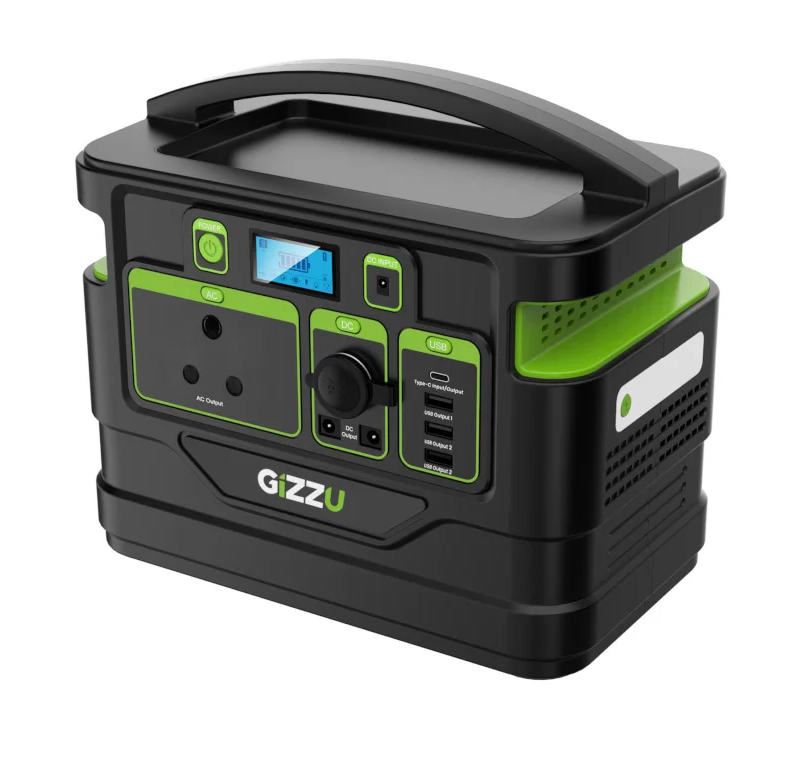
The Gizzu GPS500
The Gizzu performed admirably. On my first run, the battery lasted 3 h, which is very close to the 3.2 h expected for the 157 W load. One thing that was quite irritating was the cooling fan was quite noisy.
To produce a power-usage graph, I had to be creative. The Gizzu's display consists of just a five-segment battery indicator, with each bar representing 20% of the remaining capacity. From the first test I knew the battery lasted three hours, so each bar should disappear roughly every 36 minutes. Armed with a lamp, a pair of binoculars and a notebook, I watched the display from across the room and recorded the time each bar disappeared. The resulting graph shows the discharge was reassuringly linear.
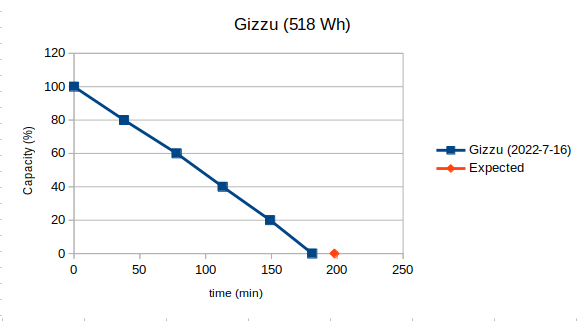
Power usage on the Gizzu
Results
- Expected run time: 3.2 h
- Achieved run time: 3.0 h
- 91% of rated capacity
Irritations:
- Very long charging time - it took almost 8 h to charge from mains. As the power brick only draws 60 W, it is easy to see why it charges very slowly;
- Primitive display - only a bar graph and a few meaningless pictograms (I hate pictograms);
- No solar adaptor - I was unable to source a 4 mm barrel plug in SA, so I couldn't even build my own adaptor;
- No indicator lights on the power buttons - there is no way of knowing if any of the outputs are active;
- Noisy inverter fan.
I eventually sold the box to Oom Ferdie. His television and DStv decoder drew only 87 W, which meant the cooling fan never switched on. In that application, the Gizzu proved to be an excellent fit.
(updated: 1 August 2026)
Red-E Portable Power Station (614 Wh)
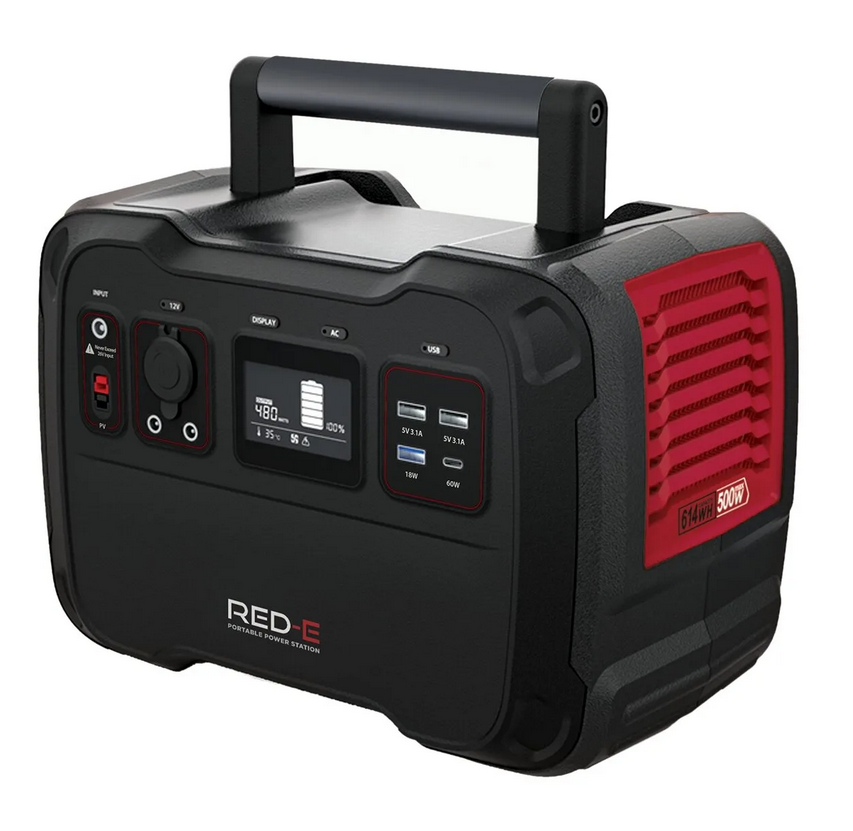
While browsing camping gadgets at Outdoor Warehouse, a salesman brought the Red-E power box to our attention. The attraction was that it had a LiFePO4 battery. At that stage, most other boxes available in South Africa had Li+ batteries. The chemistry of the LiFePO4 battery gave a much longer recharge/discharge cycle lifetime, so I decided to try it as a replacement for the Gizzu.
The Red-E
Of the boxes I had looked at, this was the only one with a foldable handle — this is a plus point when trying to pack a power box. The display gives useful information, but as with the Gizzu, the inverter fan is quite noisy. It did have a solar panel adaptor from a red/black Anderson input to MC4.
Power usage on the Red-E
Results
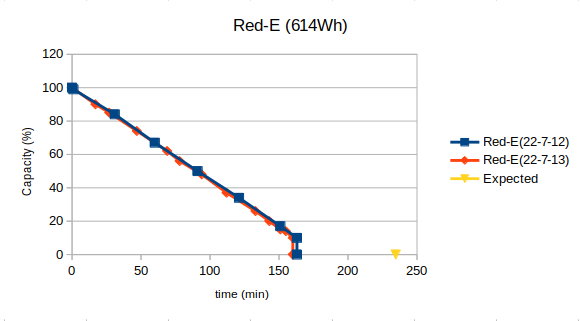
- Expected run time: 3.9 h
- Achieved run time: 2.7 h
- 69% of rated capacity
Although the charging time was a reasonable improvement over the Gizzu (about 6½ hours from mains, drawing 110 W), the box still fell well short of its rated battery capacity. It too was returned.
(updated: 2 August 2026)
Jackery Explorer 500 (518 Wh)
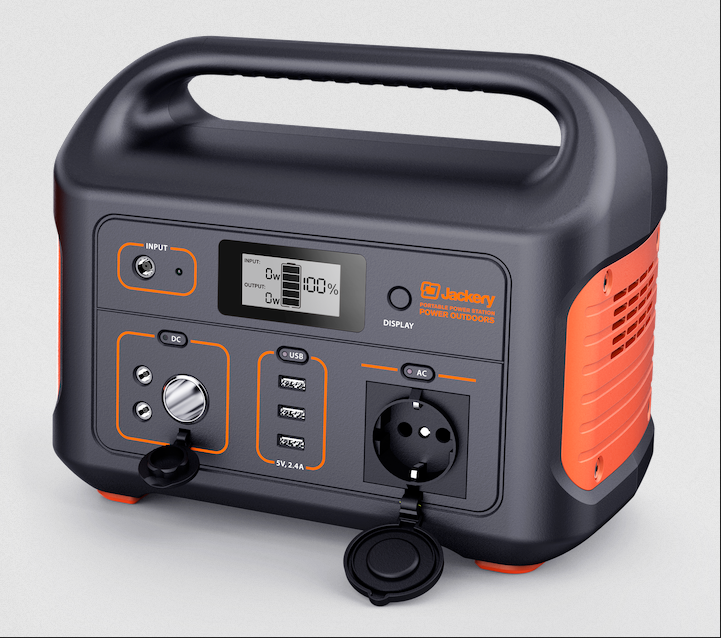
On returning the Red-E, I decided to try the Jackery, even though it was R1000 more expensive. One of its biggest attractions was the range of accessories available. Jackery had been around for some time, so items such as DC7909-to-Anderson adaptors and 5 m solar extension cables were readily available. Like the Gizzu, however, it has a single charging port and no solar adaptor is supplied.
The Jackery Explorer 500
Power usage on the Jackery Explorer 500
Results
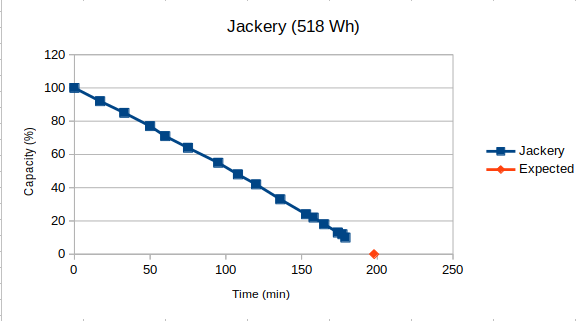
- Expected run time: 3.2 h
- Achieved run time: 3.0 h
- 91% of rated capacity
Although the figures are almost identical to those of the Gizzu, the Jackery began flashing its display when the battery reached 10% remaining, so I ended the test at that point. As the graph shows, the Jackery's discharge curve would have reached zero at almost exactly the same time as the Gizzu. This box was a keeper.
The charge time of just more than 6h was similar to that of the Red-E. It drew 100 W while recharging from the mains (and showed 88 W on the display), so was quicker than the Gizzu.
During lockdown, I helped Jeanie choose a power box. She had originally wanted a Gizzu, but they were unavailable at the time, so I persuaded her to buy an Explorer 500 instead. I felt the Jackery was the better choice for her, particularly because the switches have indicator lights.
Naturally, I tested her unit as well.
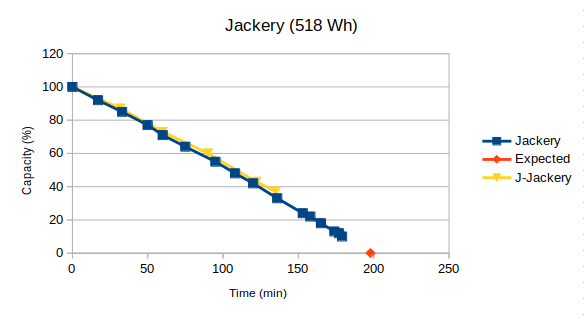
Power usage on the Jackery Explorer 500
I was pleased to see that the discharge curves of the two boxes were almost identical, with the newer unit performing marginally better.
A problem I did encounter when testing the car charging cable for the first time was that it did not work. The Bluetti cable worked fine. I have to give kudos to the Jackery support team, though: I contacted them by email on a Friday morning and, by early the next Wednesday morning, a courier had delivered a replacement, free of charge. Jackery ZA's support is absolutely top notch.
(updated: 2 July 2026)
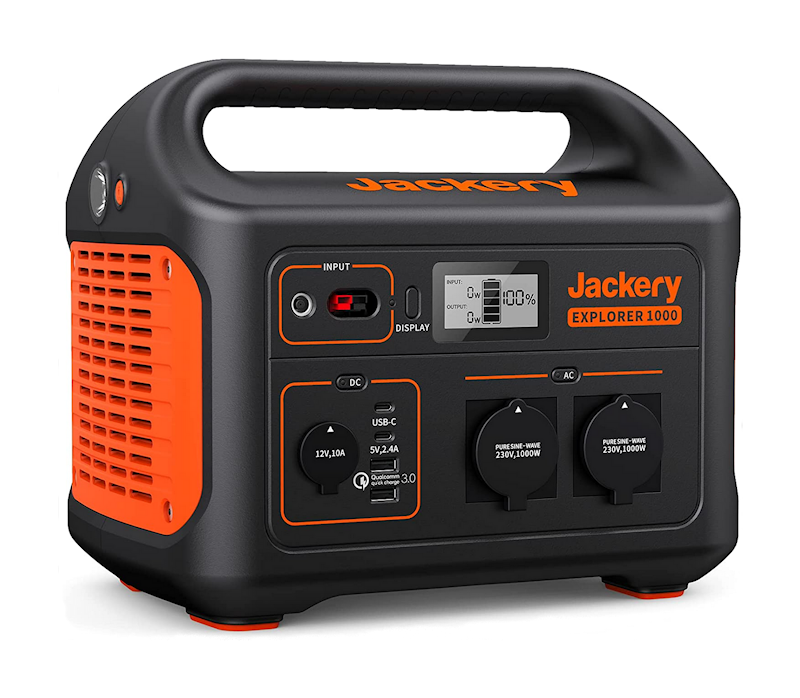
Jackery Explorer 1000 (1002 Wh)
The results for this box differ slightly from the others because I did not own it. Cara bought an Explorer 1000 during load shedding and asked me to test it. Although I didn't have enough time to run it flat, I discharged it to below 50% of its capacity using my standard test system.
The Jackery Explorer 1000
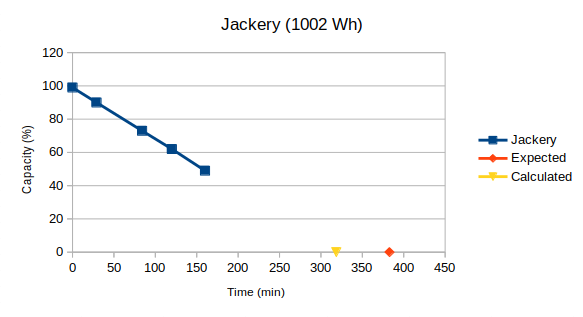
Power usage on the Jackery Explorer 1000
Results
As the discharge curves of all the previous boxes were essentially linear, and this one behaved similarly, I used a linear least-squares fit to estimate when the battery would have been fully discharged.
- Expected run time: 6.4 h
- Calculated run time: 5.3 h
- 83% of rated capacity
One thing I did notice was that the Explorer 1000 consistently reported a much higher power draw than my GeeWiz power meter (177 W compared with 157 W). I don't know whether the Jackery's meter was inaccurate or whether the larger inverter consumed more power itself.
It ran my kitchen fridge with no problems. All the smaller boxes switched off when the fridge's compressor started up.
The supplied 180 W power brick should help offset the larger battery capacity, although I was unable to test the charging time. The Explorer 1000 also has an Anderson input capable of accepting up to 200 W of solar power (limited to 180 W by the MPPT controller) and is supplied with an adaptor for two SolarSaga 100 panels.
Solar charging
I have included this section for completeness, as it does not warrant inclusion on my solar panel page.
As the Jackery 1000 can be charged from two Jackery Solar Saga 100 panels, I was interested to see how efficiently it would work. Individually, the panels initially produced 91 W and 89 W through the adaptor. As expected, their output dropped to around 74 W each as they warmed up. What was extremely disappointing was that the two panels together only produced 113 W. This means that the box would take almost 9 h to charge from solar, from empty. Jackery claimed that the box should charge within 6.5 h from two panels.
For the extra 40 W, it's hardly worth spending an extra R7000 on a second panel.
(updated: 6 August 2026)
Bluetti EB70 (716 Wh)
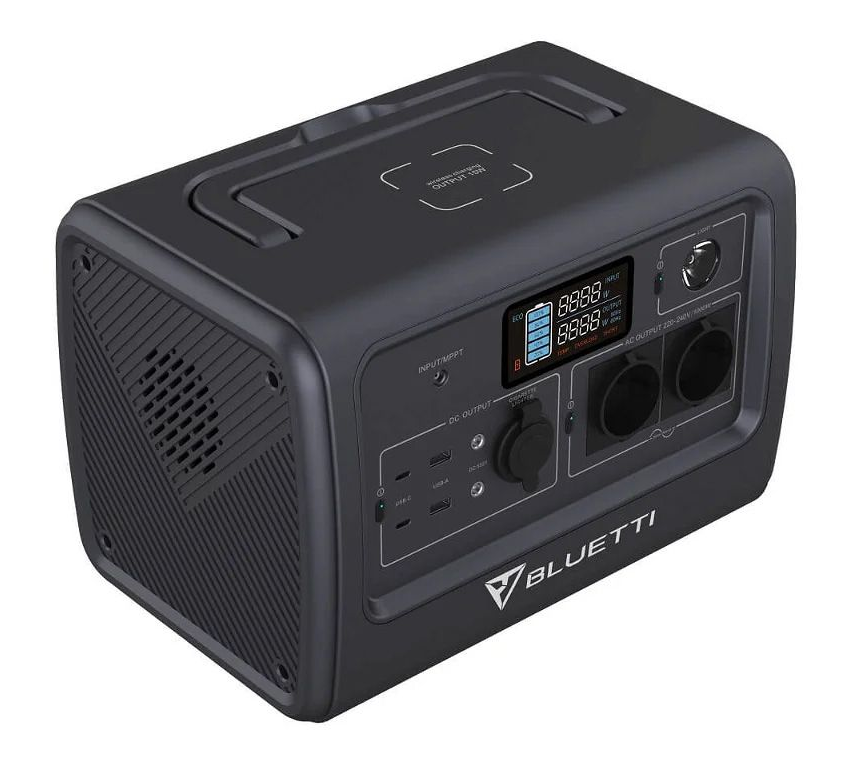
When the amount of load shedding increased in 2023, we decided to look at a box with a larger capacity than the Jackery Explorer 500. This box also had to be able to run the kitchen fridge. Pat had watched a video from Jasonoid on Youtube covering the Bluetti EB70 and she suggested it might be worth investigating. The EB70 available locally had an inverter with a 1 kW output which could handle a 1.4 kW spike (the one Jasonoid tested only had 700 W output), so I decided to buy it. Another point in its favour was the LiFePO₄ battery, a feature I had come to regard as essential.
The EB70 has a DC7909 input socket, so I could use the Jackery SolarSaga panel and extension cables I already owned. It also comes with an MC4-to-DC7909 adaptor for connecting third-party solar panels.
The Bluetti EB70
The display is rather primitive, but not nearly as bad as the Gizzu mentioned above. At least it does show the input and output power levels. I am not sure how accurate these are as with my test system, the EB70 showed a usage of 148 W, not the 157 W shown by my external power meter. The lack of a dedicated display button irritates some reviewers, but I found a simple workaround. A quick press of the lamp button while the EB70 is charging or discharging wakes the display for about 30 seconds without switching on the lamp.
The power brick supplies 200 W of charging power but it does have a built-in fan which runs continuously while connected to the mains. Although this fan is rather noisy, it is probably as loud as a kitchen fridge when the compressor is running. Another difference to other power boxes is that the EB70's fan also switches on during AC charging. The sound of the two fans together do make quite a bit of noise. One thing I must say though the EB70's fan is nowhere near as loud as that of the Gizzu. (Also, during my testing session, which was more than four hours running my test system, the EB70's fan did not switch on once, which is different to all the other boxes I have tested.)
As the EB70 also only shows a bar graph, rather than an SoC percentage, I had to use a similar tactic to the one I used for the Gizzu to get readings. For my 157 W load, at 100% efficiency, I should lose a bar every 55 minutes and at 80% efficiency, I should lose a bar every 45 minutes, so I started checking the display regularly after 35 minutes elapsed. To my dismay, the first bar had disappeared after only 41 minutes, which looked as though this box might also have to be returned if the linear usage curve, shown by the other boxes, was followed. Fortunately, this was not the case, as you can see from the graph.
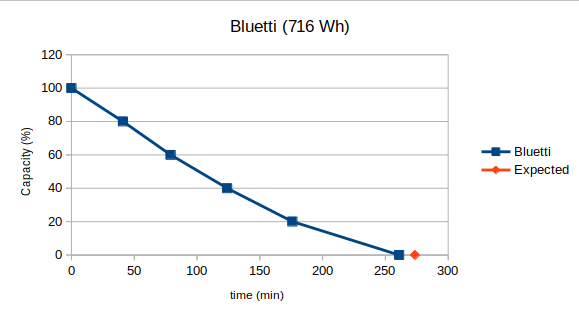
Power usage on the Bluetti EB70
Results
Unlike the other boxes, the discharge curve is not linear but resembles an exponential decay. Most of this behaviour comes from the final two segments, which lasted 52 and 85 minutes respectively.
- Expected run time: 4.56h
- Achieved run time: 4.35h
- 95% of rated capacity
==//==
The EB70 runs my kitchen fridge with no problems.
Some numbers regarding charging from empty:
- The power brick draws about 230 W from the mains.
- The EB70 accepts about 180 W while charging from the power brick.
- The fan in the EB70 switched off shortly before charging completed, making it a useful indication that the battery was almost full.
- Total charge time about 4 h 50 m.
Using the Jackery SolarSaga 100 panel, the EB70 took just over five hours to charge from around 50%, although intermittent cloud affected the results. Repeating the test with the Bluetti PV200 reduced the charging time to about 3½ hours.
During an extended power outage I also investigated the EB70's ability to charge while powering loads. The results are discussed on the Simultaneous charging and discharging page.
I had also hoped to run the 750 W pump used for my JoJo installation. Although its running power (936 W measured) was within the EB70's rated output, the startup surge prevented the inverter from running it.
(updated: 7 August 2026)
Hinen PS3000 (2.560 kWh)
The Hinen PS3000 is reviewed in considerably more detail elsewhere, so this section is only a summary of the relevant results.
The Hinen PS3000 has a 3 kW inverter, a battery capacity of 2.560 kWh and a 5 kW surge capability. It supports pass-through charging with UPS functionality and a 14 ms switchover time.
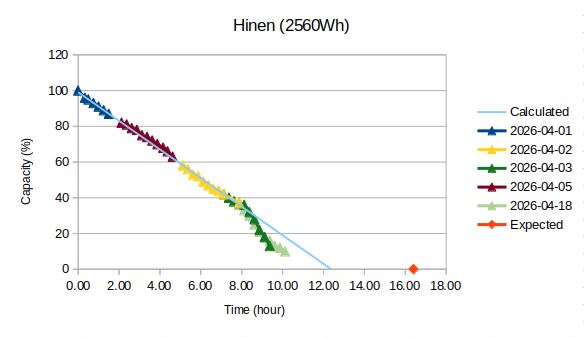
Power usage on the Hinen PS3000
Results
- Expected run time: 16.4 h
- Achieved run time (light green curve): 11.5 h
- 70% of rated capacity
Despite the rather poor battery performance, I kept this box because its DC7909 solar charging ports match the equipment I already own. More importantly, the 3 kW inverter performed exceptionally well in all my tests.
(updated: 8 August 2026)
What have I learnt?
The most important lesson from testing these power boxes is that the advertised battery capacity cannot necessarily be taken at face value. The actual usable capacity varied considerably between the boxes I tested, and even the Hinen PS3000 delivered considerably less than its rated capacity.
The other lesson is that capacity is not the only consideration. Charging speed, inverter capacity, solar input, connector compatibility and the ability to run the appliances you actually want to use can be just as important.
My requirements have also changed. The Jackery Explorer 500 was an excellent solution for keeping the television running during load shedding, while the Bluetti EB70 became the better choice when I needed enough power to run the fridge. The Hinen PS3000 has now replaced it as my main power box because of its much larger inverter and compatibility with my existing solar equipment.
If there is one thing I would recommend, it is to work out what you actually need the box to do before looking at the advertised capacity. A 500 Wh box that does what you need may be a much better choice than a 2 kWh box that doesn't.
(updated: 8 August 2026)
