Linux Operating System
Samsung NC10: Compose Key
Introduction
A useful feature of most Linux systems is the compose character sequence. Here, a special key (called the compose key) is used to initiate a sequence of two keys to form a character in the UTF-8 character set. These characters are not directly accessible from the keyboard. The sequences are especially useful for typing characters from European languages while using a keyboard with American layout. For instance, the sequence for ü would be compose key + " + u. Another one often overlooked by website developers is the degree symbol (°) which is compose key + o + o.
Setting up the Compose Key
On systems like KDE, the compose key can be defined directly from the System Settings. On lightweight systems such as Xfce and LXDE a bit more effort is required. Fortunately, there are people on the web still willing to share such information. You need to edit a system config file in the /etc/default directory. As this is a system file, you need to use the super user sudo command to edit the file. To edit this file I would suggest using a command line editor such as vi or nano to edit the file. nano is slightly more user friendly than vi so I suggest you use that. Before editing the file I recommend making a backup copy of the file.
		cd /etc/default
		sudo cp keyboard keyboard.old
You can now edit the keyboard file:
sudo nano keyboard
Look for XKBOPTIONS="" and add the key code for the key you wish to use as your compose key. On the NC10, I recommend using either the windows key (compose:lwin) or the menu key (compose:menu). Change XKBOPTIONS="" as follows if you wish to use the menu key:
XKBOPTIONS="compose:menu"
Save the file (ctrl-o), exit nano (ctrl-x) and reboot the computer for the changes to take effect.
Unfortunately, changing this file generates an error in the boot process on both LXDE and Xfce. The system works and the compose key works, but it is irritating to see this error flash by in the boot process (unfortunately, with the addition of an SSD to the NC10, the message disappears too quickly to read). You can use the following command in a console window, to find the error:
sudo cat /var/log/boot.log
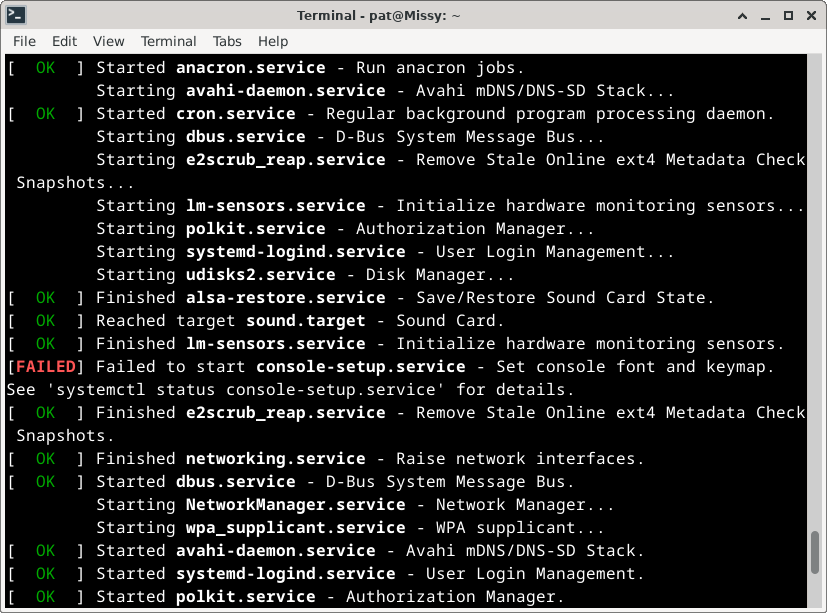
The output from the previous command
With LXDE, the error disappeared after the second boot of the system after setting the compose key. On Xfce, it was more persistent, but I did find a solution on the Linux Mint forum.
sudo systemctl restart console-setup.service
Useful Compose Key Sequences
There are many sources of compose key sequences on the web, but here are a few I use regularly:
I like this list, even though it is dated. It is fairly comprehensive.
I really would have liked to have seen some Greek characters in the set of compose key characters, but unfortunately, these are not available.
(updated: 14 May 2024)
